Logging in a Flask Application with Loguru
Posted on 31 Dec 2025
Introduction
Logging is a core component of any production-ready Python application. It provides visibility into runtime behavior and allows issues to be diagnosed in environments where debugging is not possible.
In a Flask application, logging spans request handling, business logic, and integrations with external systems. A consistent logging strategy is essential to understand failures and execution flows over time.
This article shows how to configure logging for an entire Flask application, following the same three-tier architecture described in Building a Flask Application Using Three-Tier Architecture with Python and SQLAlchemy.
The focus is on a centralized logging setup and on using logging where it actually adds value, rather than relying on scattered print() statements or ad-hoc debugging.
You should read this article if:
- you want a centralized logging setup for a Flask application instead of scattered debugging statements
- you need to route logs to stdout, files, or both depending on the environment
- you want Flask and standard library logs to flow through the same logging pipeline
Why Logging Instead of print()
Using print() for debugging is common in small scripts, but it does not scale beyond local experimentation. As an application grows, print() quickly becomes a limitation rather than a tool.
print() provides no log levels, no filtering, no structure, and no control over output destinations. It cannot handle rotation, retention, or integration with external logging systems, and it offers no contextual information beyond the raw message.
A proper logging system, instead, allows you to control verbosity, categorize messages by severity, enrich logs with context (timestamps, class and method names), and route output to different destinations such as stdout, files, or centralized logging platforms.
In short, print() shows what is happening now, while logging explains what happened over time and why.
Why Loguru Instead of Python’s Standard logging
Python’s standard logging module is powerful and flexible, but it often requires verbose configuration and careful handler management. In practice, this makes it easy to introduce subtle misconfigurations, especially in small and medium-sized applications.
The standard logging module offers great flexibility but lacks sensible defaults. Common requirements such as logging to multiple outputs (stdout and/or files), log rotation, retention, and integration with external systems usually require manual handler wiring and duplicated boilerplate.
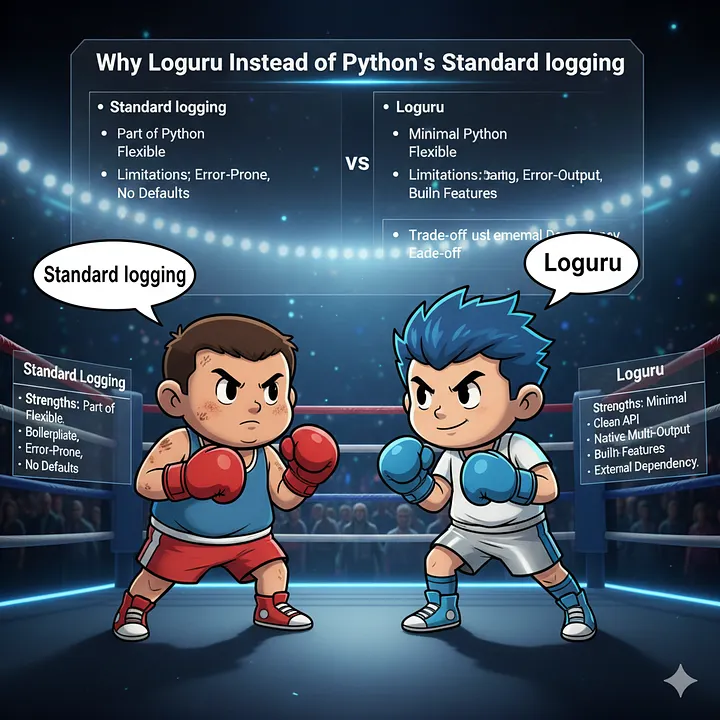
Loguru was designed to simplify these aspects while remaining fully compatible with the standard logging ecosystem.
Standard logging
Strengths
- Part of the Python standard library
- Widely supported by third-party libraries
- Highly configurable
Limitations
- Boilerplate-heavy setup
- Error-prone handler and formatter configuration
- No sane defaults
- Contextual logging requires additional code
- Multiple outputs and external integration require manual coordination
Loguru
Strengths
- Minimal and explicit configuration
- Clean and consistent API
- Native support for multiple outputs (stdout, files, or both)
- Built-in rotation, retention, and compression
- Automatic exception formatting
- Contextual logging via
bind - Transparent interception of standard logging
- Naturally compatible with external logging systems via stdout or file
Trade-offs
- External dependency
- Less familiar to developers used to the standard module
For Flask applications running in modern environments such as containers, Kubernetes, or cloud platforms, Loguru simplifies log management by emitting consistent logs to stdout or files. These can be collected by external systems without requiring application-level changes, keeping logging centralized and decoupled from business logic and infrastructure.
Logging and Configuration as Low-Level Components
In a layered architecture, logging is a low-level infrastructural concern. However, it is not the lowest one.
As explained in Managing Application Configuration in Python with Pydantic Settings, the configuration component sits at the very bottom of the dependency graph. Logging depends on configuration values such as log level, output destinations, and rotation policies.
A typical configuration for logging might look like this:
log:
  level: "INFO"
  console: true
  file: "logs/races.log"
  rotation: "10 MB"
  retention: "7 days"
  compression: "zip"
These parameters define:
- Log level: how verbose the application should be
- Console logging: whether logs should go to stdout
- File logging: whether logs should be persisted to disk
- Rotation: when log files should be rotated
- Retention: how long old logs should be kept
- Compression: how rotated logs should be archived
Stdout vs File Logging
Choosing where to send logs is not just a technical decision, but an architectural one.
-
Containerized applications should generally log to stdout. This allows infrastructure components such as sidecar containers, log collectors, and platforms like IBM Cloud Logs to aggregate, process, and ship logs externally.
-
CLI applications or local tools benefit more from file logging, to avoid mixing operational logs with user-facing output.
For this reason, logging configuration must be flexible and environment-aware.
Implementation Overview
The logging implementation is centralized in a single module. In the Running Races application, this logic lives in the core/log.py file.
This module exposes a single public entry point, setup_logging, which is called once during application startup. All configuration parameters are loaded from config.yml, as described in the configuration article referenced earlier.
def setup_logging(
    level: str = "INFO",
    console: bool = True,
    file: str | None = None,
    rotation: str = "10 MB",
    retention: str = "7 days",
    compression: str = "zip",
) -> LoggerManager:
    return LoggerManager(
        level=level,
        console=console,
        file=file,
        rotation=rotation,
        retention=retention,
        compression=compression,
    )
At application startup, logging is initialized as follows:
setup_logging(
    level=settings.log.level,
    console=settings.log.console,
    file=settings.log.file,
    rotation=settings.log.rotation,
    retention=settings.log.retention,
    compression=settings.log.compression,
)
This startup call wires the configuration layer into the logging layer once, so the rest of the application can rely on a single logging policy.
The LoggerManager acts as an infrastructure component: it is initialized early, depends only on configuration, and is reused throughout the application.
Logger Initialization Flow
The core of the setup happens inside the LoggerManager constructor.
In the real implementation this class lives inside the logging module together with the supporting imports, format constants, and helper classes. The excerpt below focuses only on the initialization flow.
class LoggerManager:
    def __init__(
        self,
        level: str = "INFO",
        console: bool = True,
        file: str | None = None,
        rotation: str = "10 MB",
        retention: str = "7 days",
        compression: str = "zip",
    ) -> None:
        self.level = level.upper()
        self.console = console
        self.file = file
        self.rotation = rotation
        self.retention = retention
        self.compression = compression

        logger.remove()
        self._configure_logger()
        self._intercept_standard_logging()
As you can see, the initialization follows three explicit steps.
Removing the Default Loguru Logger
When Loguru is imported, it automatically registers a default handler that writes to stderr using a predefined format. While this is convenient for quick scripts, it is not suitable for a real application.
The default handler is removed to:
- Avoid duplicated log output
- Prevent inconsistent formatting
- Gain full control over log levels, outputs, and formatting
By removing the default logger, the application takes complete ownership of the logging configuration.
Configuring the Application Logger
After removing the default handler, a new logger is configured based on application settings.
def _configure_logger(self) -> None:
    """Configure loguru logger based on settings."""

    def format_record(record) -> str:
        format_map: dict[bool, str] = {
            True: APP_LOG_FORMAT,
            False: INTERCEPTED_LOG_FORMAT,
        }
        return format_map["name" in record["extra"]]

    if self.console:
        logger.add(
            sink=sys.stdout,
            format=format_record,
            level=self.level,
            colorize=True,
        )

    if self.file:
        log_path: Path = Path(self.file)
        log_path.parent.mkdir(parents=True, exist_ok=True)

        logger.add(
            sink=self.file,
            format=format_record,
            level=self.level,
            rotation=self.rotation,
            retention=self.retention,
            compression=self.compression,
            enqueue=True,
        )
This step defines:
- Where logs are written (stdout, file, or both)
- The log level
- The log format
- Rotation, retention, and compression policies
Console logging is typically used in containerized environments, while file logging is useful for CLI tools or local execution. Loguru makes it easy to support both outputs simultaneously without complex handler coordination.
At this stage, the logging policy of the application is fully defined.
Intercepting Standard Library Logging
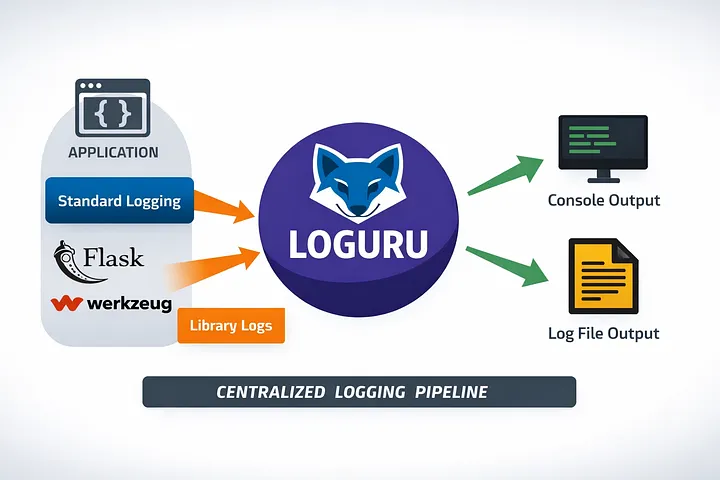
Flask, Werkzeug, and many third-party libraries rely on Python’s built-in logging module. Without interception, the application would end up with two separate logging systems, producing logs with inconsistent formats, levels, and outputs.
LoggerManager solves this by intercepting standard logging and redirecting it to Loguru. This ensures that all logs, including application, framework, and external libraries, flow through a single, centralized pipeline.
class InterceptHandler(logging.Handler):
    def emit(self, record: logging.LogRecord) -> None:
        try:
            level = logger.level(record.levelname).name
        except ValueError:
            level = record.levelno

        frame: FrameType | None = logging.currentframe()
        depth = 2
        while frame and frame.f_code.co_filename == logging.__file__:
            frame = frame.f_back
            depth += 1

        logger.opt(depth=depth, exception=record.exc_info).log(
            level, record.getMessage()
        )


class LoggerManager:
    def _intercept_standard_logging(self) -> None:
        """Intercept standard library logging and redirect to loguru."""
        logging.basicConfig(handlers=[InterceptHandler()], level=0, force=True)

        for logger_name in ["werkzeug", "flask.app"]:
            log = logging.getLogger(name=logger_name)
            log.handlers = [InterceptHandler()]
            log.propagate = False
This approach routes logs from your application, Flask, and other libraries through the same pipeline without duplication or conflicts. Exception information and the correct source (file, function, line) are preserved, making the logging pipeline reliable and production-ready.
The key point is that framework logs stop being a separate stream: once intercepted, they follow the same formatting and destination rules as your application logs.
Using Logging in a Flask Application

Logging should be used intentionally. Logging everything everywhere leads to noise, not insight.
Where Logging Is Not Useful
- Small utility classes with trivial logic
- SQLAlchemy models (their behavior is declarative and opaque)
- Pure data structures
Logging at these levels rarely adds value and often obscures meaningful signals.
Where Logging Is Useful
- Controllers (request handling, input validation, errors)
- Services (business logic, workflows, integrations)
- External service interactions
- Non-trivial computations or decision points
Example: Service Layer
Service classes are a natural place for logging because they implement business logic and orchestrate multiple components.
from app.core.log import LoggerManager


class RaceService:
    def __init__(self) -> None:
        self.logger = LoggerManager.get_logger(self.__class__.__name__)

    def create_new_race(self, race: Race) -> Race:
        """Create a new race and return it as a DTO."""
        try:
            self.logger.info(f"Created new race '{race.name}' with ID {race_dao.id}")
        except SQLAlchemyError as e:
            self.logger.error(f"SQLAlchemy error creating race '{race.name}': {e}")
A service can bind a logger once and reuse it across methods, providing consistent context in every log entry.
Example: Controller Layer
Controllers are responsible for handling HTTP requests and mapping them to services.
from app.core.log import LoggerManager


class RaceController:
    def __init__(self) -> None:
        self.logger = LoggerManager.get_logger(self.__class__.__name__)

    def delete_race(self, race_id: int) -> WebResponse:
        try:
            ...
        except RaceNotFoundError:
            ...
        except Exception as e:
            self.logger.error(f"Error deleting race {race_id}: {e}")
Here, logging is particularly useful for:
- Request lifecycle tracking
- Validation errors
- Unexpected exceptions
- High-level flow visibility
By keeping logging focused on controllers and services, the logs reflect what the application does, not just how it is implemented.
Conclusion
A well-designed logging system is not an afterthought: it is a core infrastructural component of any serious Python application.
In this article we covered:
- why
print()stops being useful once a Flask application grows beyond local debugging - how to configure Loguru centrally using application settings
- how to intercept standard library and Flask logs so everything flows through one pipeline
- where logging adds value in controllers, services, and external integrations
The next article will show how to apply the same ideas in a FastAPI application, where the integration points change but the architectural goals stay the same.
If you enjoyed this article, don’t forget to give it a clap 👏, share it with your friends 🔗, and follow me for more tips and tutorials on software development 📘. Your support helps me create more content like this — thank you! 🙌