Concurrency in Python: Threads, Processes, and the Event Loop
Posted on 06 Sep 2026

Introduction
Your Python application works fine until the moment it has to do more than one thing at a time. A web server blocking on every database query, a scraper waiting for each HTTP response before firing the next — the code is correct, it just does not scale. Python offers three concurrency models to fix this: threads, processes, and the event loop. Each solves a different problem, and choosing the wrong one costs you performance or correctness.
This article is part of the Modern Python Application series.
You should read this article if:
- You have hit a performance wall with sequential Python code and want to understand your options.
- You are confused about when threads help and when the GIL gets in the way.
- You want to understand why
asynciobecame the standard for high-concurrency services.
The Restaurant Metaphor
Think of your Python program as a restaurant.
Sequential model — one waiter takes an order, walks to the kitchen, and stands there until the dish is ready before returning. The cook (I/O, a DB query, a network call) does all the work while the waiter stands idle.
Thread pool model — a dispatcher assigns each order to a pool waiter who walks to the kitchen and waits. Multiple orders are in-flight simultaneously. The catch: every waiter occupies memory even while idle, and coordinating handoffs costs time — the equivalent of context switching between threads. The more waiters, the higher the overhead. This model worked well for enterprise web apps when concurrency stayed in the hundreds.
Event loop model — one efficient waiter drops an order at the kitchen pass and immediately moves to the next table. She never waits. Periodically she checks which dishes are ready and delivers them. If the restaurant can afford multiple waiters of this kind — one per CPU core — throughput scales proportionally, each running her own independent event loop. Node.js popularised this model in 2010; Python’s asyncio followed in 2014 and today underpins FastAPI, aiohttp, and every high-throughput Python service.
The event loop does not make individual operations faster — it makes the waiting disappear.
Parallelism vs Concurrency
Two terms that are often used interchangeably but mean different things.
Parallelism — multiple tasks execute at the same instant on multiple CPU cores. Wall-clock time is divided by the number of cores.
Concurrency — multiple tasks are in progress at the same time, but not necessarily executing simultaneously. A single core interleaves them: work on A, pause, switch to B, pause, switch to C. No two tasks run at the exact same instant, but all make progress.
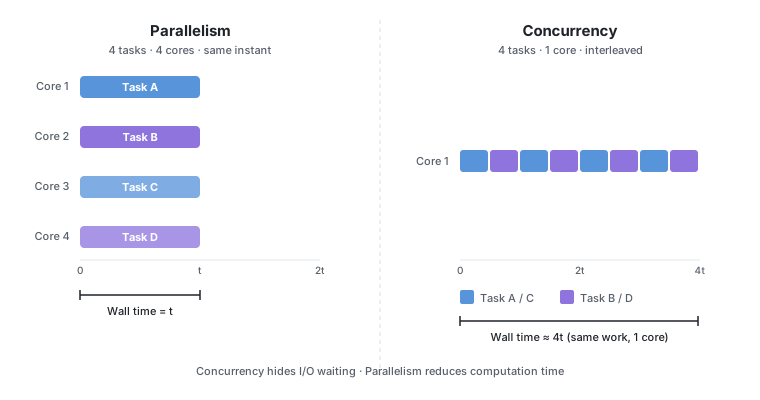
Concurrency is about dealing with many things at once. Parallelism is about doing many things at once.
The trade-off: concurrency hides waiting (I/O), parallelism reduces computation time. This maps directly onto Python’s three models:
asyncio— concurrency on a single thread. Hides I/O waiting. Does not reduce computation time.ThreadPoolExecutor— concurrency across threads. Hides I/O waiting. Does not reduce computation time (GIL).ProcessPoolExecutor— true parallelism. Reduces computation time for CPU-bound work.
Threads vs Processes
A thread and a process are both units of execution, but they differ in one fundamental way: what they share.
A thread lives inside a process. All threads in the same process share the same memory — the same heap, the same global variables, the same open file handles. Communication between threads is fast and free: one thread writes to a variable, another reads it. The downside is that this sharing requires coordination, and in CPython it means sharing the GIL.
A process is a fully isolated execution environment. It has its own memory space, its own Python interpreter, and its own GIL. Processes do not share memory — to pass data between them, objects must be serialised (pickled) and sent through a pipe or queue. The upside: with no shared GIL, multiple processes run Python bytecode in true parallel on separate cores.
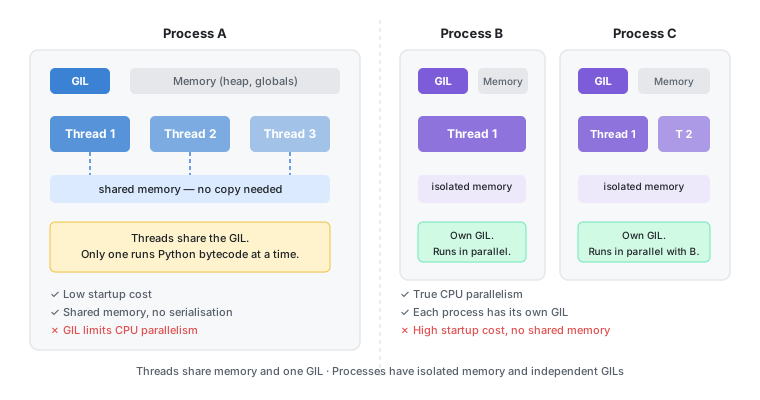
The diagram shows why this matters for Python concurrency. Threads inside Process A share one GIL — only one runs at a time. Process B and Process C each have their own GIL and run simultaneously on separate cores. This is exactly why ProcessPoolExecutor bypasses the GIL while ThreadPoolExecutor does not.
| Threads | Processes | |
|---|---|---|
| Memory | Shared — no copy needed | Isolated — data must be serialised |
| GIL | Shared — one at a time | Independent — true parallelism |
| Startup cost | Low | High (spawn a new interpreter) |
| Communication | Direct (shared variables) | Via queues or pipes (pickling required) |
| Best for | I/O-bound concurrency | CPU-bound parallelism |
The GIL: Why Threads Are Not What You Think
Python’s threading module exists and works, but there is a catch: the Global Interpreter Lock (GIL). The GIL is a mutex inside CPython that allows only one thread to execute Python bytecode at a time, regardless of how many CPU cores your machine has.
This is fundamentally different from Java or C#, where the JVM and CLR manage memory with a garbage collector that does not need reference counting — so there is no GIL. In those languages, four threads on a four-core machine execute bytecode in true parallel. If you have fewer cores than threads, you get concurrency (threads take turns); if you have as many cores as threads, you get genuine parallelism.
In CPython the picture is different.
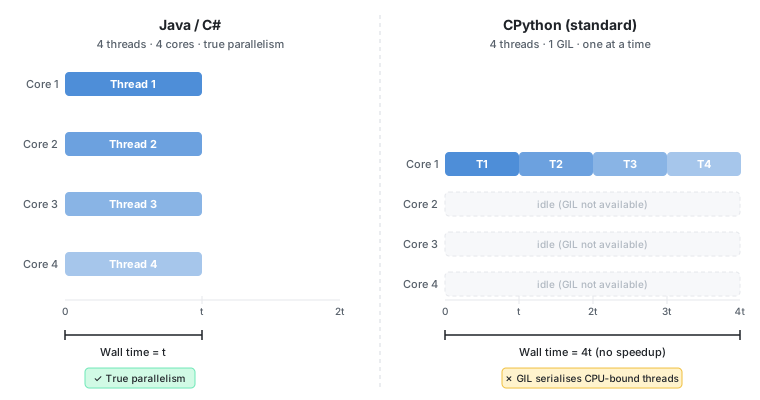
In Java, four threads run simultaneously on four cores — wall time equals t. In CPython, the same four threads run one at a time on a single core — wall time is 4t, with cores 2–4 sitting idle waiting for the GIL.
This has two practical consequences.
When the GIL Is Released
The GIL is not held permanently. CPython releases it in two situations: during I/O waits (network, disk, database) and inside C extensions that explicitly drop it (NumPy, PyCryptodome, lxml). In both cases, other threads can run while one is waiting or computing in C.
- I/O-bound tasks: threads work well. When a thread waits for a network response, a file read, or a database query, CPython releases the GIL for the duration of that wait. Another thread picks it up and runs. You get real concurrency — just not on the CPU calculation itself, but on the waiting.
- CPU-bound tasks: threads give you nothing. All threads fight over the single GIL. A CPU-heavy calculation running in four threads on a four-core machine runs no faster than on one core — and slightly slower due to context switching overhead. In contrast, a Java developer using a thread pool for CPU work gets genuine parallelism; the same pattern in CPython gives worse results than a single thread.
import threading
import time
import urllib.request

def fetch(url):
    with urllib.request.urlopen(url) as response:
        return response.read()

urls = [
    "https://httpbin.org/delay/1",
    "https://httpbin.org/delay/1",
    "https://httpbin.org/delay/1",
]

start = time.time()
threads = [threading.Thread(target=fetch, args=(url,)) for url in urls]
for t in threads:
    t.start()
for t in threads:
    t.join()
print(f"Elapsed: {time.time() - start:.1f}s")  # ~1s, not 3s
Three one-second HTTP requests finish in roughly one second because all three threads wait concurrently while the GIL sits idle during the actual network I/O.
This is exactly the I/O-bound case: the GIL is released during the network wait, so the threads are genuinely concurrent. If instead of making an HTTP request each thread ran a CPU-heavy calculation, the result would be ~3 seconds — or worse, due to the extra context switching overhead on top of serial execution.
The following example replaces the HTTP call with a CPU-bound task — summing a large range of numbers, which keeps the GIL held the entire time:
import threading
import time

def cpu_task():
    # time.monotonic() returns a monotonically increasing clock (never goes
    # backwards, unaffected by system clock adjustments) — reliable for
    # measuring durations. We busy-loop for exactly 1s on any machine.
    deadline = time.monotonic() + 1.0
    while time.monotonic() < deadline:
        pass  # pure Python busy loop — GIL never released

start = time.time()
threads = [threading.Thread(target=cpu_task) for _ in range(3)]
for t in threads:
    t.start()
for t in threads:
    t.join()
print(f"Elapsed: {time.time() - start:.1f}s")  # ~3s, not 1s
All three threads fight over the GIL. Only one runs at a time — the others wait. Total time is roughly three times the time of a single task, with no benefit over running them sequentially.
Free-Threaded Python (3.13+)
PEP 703, accepted in October 2023, introduced an experimental --disable-gil build flag in CPython 3.13, made more stable in 3.14. With the nogil build, threads can execute Python bytecode in parallel on multiple cores — real CPU-bound parallelism without multiprocessing.
import sys
print(sys._is_gil_enabled())  # False in a nogil build
The single-threaded performance penalty is approximately 5–10% (PEP 703). As of 2026, the nogil build is production-ready for many workloads and represents the most significant change to CPython’s concurrency model in the language’s history.
Threads: The Right Tool for I/O-Bound Work
For I/O-bound concurrency where you need dozens — not thousands — of concurrent operations, ThreadPoolExecutor from concurrent.futures is the idiomatic choice. The threading module gives you lower-level control, but ThreadPoolExecutor handles pool management, exception propagation, and cleanup automatically.
from concurrent.futures import ThreadPoolExecutor, as_completed
import urllib.request

def fetch(url):
    with urllib.request.urlopen(url, timeout=10) as r:
        return url, len(r.read())

urls = [
    "https://httpbin.org/bytes/1024",
    "https://httpbin.org/bytes/2048",
    "https://httpbin.org/bytes/512",
]

with ThreadPoolExecutor(max_workers=10) as executor:
    futures = {executor.submit(fetch, url): url for url in urls}
    for future in as_completed(futures):
        url, size = future.result()
        print(f"{url} → {size} bytes")
Breaking down the key choices:
max_workers=10— caps the pool size. The default in Python 3.13+ ismin(32, cpu_count + 4), which preserves at least 5 workers for I/O overlap.as_completed()— yields futures as they finish, not in submission order. Use this when tasks have different durations and you want to process results as they arrive.- Context manager (
with) — guarantees the pool shuts down cleanly and all threads complete before the block exits.
Use
ThreadPoolExecutorfor I/O-bound work that needs straightforward parallel execution without handling thousands of concurrent connections.
Processes: The Right Tool for CPU-Bound Work
When you need real parallelism for CPU-heavy work — image processing, numerical computation, data transformation — use ProcessPoolExecutor. Each worker runs in a separate Python interpreter with its own GIL, so all cores are genuinely available.
from concurrent.futures import ProcessPoolExecutor
import math

def is_prime(n):
    if n < 2:
        return False
    for i in range(2, int(math.sqrt(n)) + 1):
        if n % i == 0:
            return False
    return True

if __name__ == "__main__":
    candidates = range(10_000_000, 10_000_100)
    with ProcessPoolExecutor() as executor:
        results = list(executor.map(is_prime, candidates))
    primes = [n for n, p in zip(candidates, results) if p]
    print(f"Found {len(primes)} primes")
Two rules that catch beginners:
if __name__ == "__main__":is mandatory on macOS and Windows. Thespawnstart method (default since Python 3.14 forProcessPoolExecutor) imports the module in each worker. Without this guard, the import triggers new worker spawns, causing an infinite loop.- Only picklable objects can be passed to and returned from workers. Lambda functions, file handles, and database connections are not picklable.
The default worker count is os.process_cpu_count() — one worker per physical core. Spawning processes is expensive; use the context manager to amortize startup cost across many tasks. For project setup and dependency management best practices, see How to Set Up Your Next Python Project.
InterpreterPoolExecutor (Python 3.14+)
Python 3.14 introduced InterpreterPoolExecutor, a new executor that gives each thread its own sub-interpreter with its own GIL. It achieves true multi-core parallelism without the process spawn cost.
from concurrent.futures import InterpreterPoolExecutor

def cpu_task(n):
    return sum(i * i for i in range(n))

with InterpreterPoolExecutor(max_workers=4) as executor:
    results = list(executor.map(cpu_task, [1_000_000] * 4))

print(results)
# [333332833333500000, 333332833333500000,
#  333332833333500000, 333332833333500000]
# Four tasks completed in parallel — wall time ≈ 1× single task duration
Each interpreter is fully isolated — no shared mutable state. Data must still be picklable. This is the direct answer to the GIL problem for many CPU-bound workloads that previously required multiprocessing.
The Three Models Compared
| Threads | Processes | Coroutines (asyncio) | |
|---|---|---|---|
| GIL impact | Shared GIL, limits CPU parallelism | Each process has its own GIL | Single thread, no GIL concern |
| Memory | Shared memory space | Separate memory per process | Single thread, minimal overhead |
| Startup cost | Low | High (spawn) | Near-zero |
| Best for | I/O-bound, moderate concurrency | CPU-bound workloads | I/O-bound, high concurrency |
| stdlib class | ThreadPoolExecutor |
ProcessPoolExecutor |
asyncio.Task |
| Max practical concurrency | Hundreds | Tens (CPU count) | Tens of thousands |
The Event Loop: asyncio for High-Concurrency I/O
When concurrent connections number in the thousands — API gateways, WebSocket servers, real-time data feeds — thread pools hit a wall. Each thread consumes a non-trivial amount of memory for its stack, and context switching between hundreds of threads adds measurable overhead.
The event loop solves this with cooperative concurrency: a single thread runs many coroutines, each of which voluntarily suspends at await points to let others run. No threads, no context switching overhead, no GIL juggling. This is the same model that powers FastAPI and that we will use in the next article when building a REST API.
import asyncio
import aiohttp

async def fetch(session, url):
    async with session.get(url) as response:
        return await response.text()

async def main():
    urls = ["https://httpbin.org/delay/1" for _ in range(10)]
    async with aiohttp.ClientSession() as session:
        tasks = [fetch(session, url) for url in urls]
        results = await asyncio.gather(*tasks)
    print(f"Fetched {len(results)} responses")

asyncio.run(main())
Ten requests that each take one second complete in roughly one second — all ten coroutines are suspended at await response.text() simultaneously, and the event loop resumes each one as its response arrives.
TaskGroup: Structured Concurrency (Python 3.11+)
asyncio.gather() has a subtle flaw: if one task raises an exception, the remaining tasks are not cancelled — they continue running as orphans. Python 3.11 introduced TaskGroup, which cancels all sibling tasks when any one fails.
import asyncio
import aiohttp

async def fetch(session, url):
    async with session.get(url) as response:
        response.raise_for_status()
        return await response.text()

async def main():
    urls = [
        "https://httpbin.org/get",
        "https://httpbin.org/status/500",  # this will fail
        "https://httpbin.org/get",
    ]
    async with aiohttp.ClientSession() as session:
        async with asyncio.TaskGroup() as tg:
            tasks = [tg.create_task(fetch(session, url)) for url in urls]
    # If any task raises, all others are cancelled automatically
Use
TaskGroupwhen a failure in one task should cancel all the others — e.g. a batch of dependent requests where partial results are useless. Usegather()when tasks are independent and you want all results even if some fail, passingreturn_exceptions=Trueto collect errors instead of raising them.
Mixing Sync and Async: asyncio.to_thread()
Most existing Python libraries — requests, psycopg2, boto3 — are synchronous. Calling them directly inside an async def blocks the entire event loop. asyncio.to_thread() (Python 3.9+) runs a blocking function in a thread pool without blocking the loop. This is the same pattern we used in the cron jobs article when mixing sync schedulers with async application code.
import asyncio
import requests  # synchronous library

def blocking_fetch(url):
    return requests.get(url).text

async def main():
    # Runs blocking_fetch in a thread; event loop continues while it waits
    result = await asyncio.to_thread(blocking_fetch, "https://httpbin.org/get")
    print(result[:100])

asyncio.run(main())
This replaces the older loop.run_in_executor(None, func) pattern and is the idiomatic bridge between sync libraries and async application code.
Which Model Should I Use?

Four questions get you to the right answer:
- Is the task I/O-bound? If yes, go to question 2. If no (CPU-bound), use
ProcessPoolExecutor— orInterpreterPoolExecutoron Python 3.14+ to avoid process spawn cost. - Do you need thousands of concurrent connections? If yes, use
asyncio. If no, continue. - Do you need to call synchronous libraries inside async code? Use
asyncio.to_thread()as the bridge. - Moderate I/O concurrency with straightforward code? Use
ThreadPoolExecutor.
Scaling to Production: Gunicorn with Uvicorn Workers
The event loop model scales further when combined with multiple worker processes. Gunicorn with Uvicorn workers runs one event loop per CPU core — back to the restaurant metaphor: multiple efficient waiters, one per kitchen station.
gunicorn app:app -w 4 -k uvicorn.workers.UvicornWorker
Breaking down the options:
-w 4— four worker processes, one per CPU core. Each runs its own independent event loop.-k uvicorn.workers.UvicornWorker— each worker uses Uvicorn’s ASGI event loop instead of a synchronous WSGI worker.
This is the standard production deployment for FastAPI and Starlette applications.
Conclusion
In this article we covered:
- Why the GIL limits thread-based CPU parallelism in standard CPython, and how free-threaded Python 3.13+ changes that.
ThreadPoolExecutorfor I/O-bound work with moderate concurrency.ProcessPoolExecutorfor CPU-bound workloads requiring real multi-core parallelism.InterpreterPoolExecutor(Python 3.14+) as a process-free alternative for CPU-bound tasks.- The event loop model and why it outperforms thread pools at high concurrency.
asyncio.TaskGroupfor structured concurrency and safer error propagation.asyncio.to_thread()as the bridge between synchronous libraries and async applications.- Gunicorn + Uvicorn workers for scaling the event loop across all CPU cores in production.
This is the final article of the Modern Python Application series. You now have the full toolkit to build Python applications that are well-structured, configurable, observable, scheduled, persistent, and concurrent.
If you enjoyed this article, don’t forget to give it a clap 👏, share it with your friends 🔗, and follow me for more tips and tutorials on software development 📘. Your support helps me create more content like this — thank you! 🙌