Building a Database Layer in Python with SQLAlchemy ORM
Posted on 24 Aug 2026
Introduction
Most Python tutorials show you how to write a SELECT statement. They rarely show you what to do when you have ten services, each opening connections and sprinkling session.commit() everywhere — until one forgotten rollback corrupts your data at 2 AM.
This article builds the database layer of a layered Python application. It covers the DatabaseSessionManager, which centralises session lifecycle and transaction management, the DAO models that map your tables to Python objects, the DatabaseInitializer service that creates your schema at startup, and the DAO vs DTO boundary that keeps your architecture honest.
All the code shown here is extracted from runalyze, a personal project I built to analyse my Garmin running workouts. You can browse the full source layout on GitHub.
This post is Part 5 of the How to Write Modern Python Applications series. The previous article covered How to Create Cron Jobs in Python for Your Applications.
You should read this article if:
- you want a reusable, transactional database layer for any Python application (batch job, API, web app)
- you want SQLAlchemy’s ORM to handle SQL for you, without writing raw queries
- you want session lifecycle — commit, rollback, close — managed in one place so services never have to think about it
Project Layout
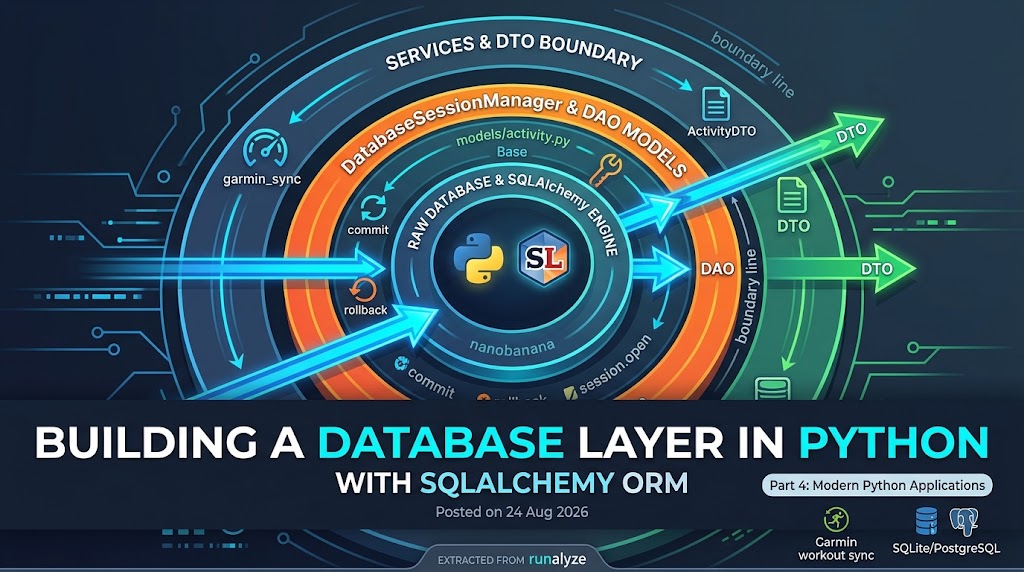
Think of the database layer as a set of concentric rings. At the centre is the raw connection (database.py). Wrapping it are the table mappings (models/). Around those are the services that do the actual work. Controllers and routes sit on the outermost ring — they call services, and nothing more.
src/runanalyze/
│
├── core/
│   ├── config.py              # Pydantic Settings (Part 3 of this series)
│   └── database/
│       └── database.py        # DatabaseSessionManager
│
├── models/
│   ├── base.py                # SQLAlchemy declarative Base
│   ├── activity.py            # ActivityDAO
│   └── activity_sample.py     # ActivitySampleDAO
│
├── services/
│   ├── db_initializer.py      # Creates tables at startup
│   └── garmin_sync.py         # Business logic (Garmin data fetch & sync)
│
├── controllers/               # Call services, never DAOs directly
└── routes/                    # Flask/FastAPI routes
The
models/folder holds Data Access Objects (DAOs) — pure table-to-class mappings. Business logic lives exclusively inservices/. Controllers and routes never touch a DAO directly.
The Declarative Base
Before you can define any table, SQLAlchemy needs a registry to collect all model metadata. One line creates it, in models/base.py:
from sqlalchemy.orm import declarative_base

Base = declarative_base()
Every DAO you write inherits from this Base. When you later call Base.metadata.create_all(engine), SQLAlchemy uses this registry to create every table it knows about in a single pass.
Configuration
The session manager reads its database URL from the Settings object. The full explanation of how Pydantic Settings works is in the previous article. Here is the relevant section of config.yaml:
database:
  sqlite:
    path: "data/garmin.db"
    echo: false
    pool_pre_ping: true

log:
  level: "INFO"
  console: true
  file: "logs/runanalyze.log"
  rotation: "10 MB"
  retention: "7 days"
  compression: "zip"
The database.sqlite section maps to a SQLiteSettings Pydantic model, which exposes computed properties like absolute_path and database_url used by the session manager. For a PostgreSQL backend, replace the sqlite block with host, port, user, and dbname, and inject the password via an environment variable.
DAO vs DTO
Before diving into the code, one conceptual boundary deserves its own section — because getting it wrong quietly corrupts the architecture.
A DAO (Data Access Object) is a Python class that mirrors a database table. It is a SQLAlchemy ORM model. Its job is to represent a row in memory and participate in transactions. It lives in the models/ layer.
A DTO (Data Transfer Object) is a plain data class — a dataclass, a Pydantic model, a TypedDict — that carries data between layers. No SQLAlchemy, no session, no database awareness whatsoever.
The critical rule is this:
A DAO must never cross a service boundary. Controllers, routes, and any caller outside the service layer must only ever see DTOs.
Why does this matter? If a controller receives an ActivityDAO instance directly, it is holding a live SQLAlchemy object bound to a session. The session may be closed. Accessing a lazy-loaded relationship raises a DetachedInstanceError. Serialising it to JSON is not straightforward. Testing the controller requires a real database.
The clean version:
- The service queries the database, gets back
ActivityDAOobjects. - The service maps them to
ActivityDTO(a plain Pydantic model or dataclass). - The service returns the DTO.
- The controller receives the DTO and does whatever it wants with it — serialize it, pass it further, log it.
In the runalyze project, the batch sync service does not have a controller above it, so no DTOs are used today. But the boundary is still respected: the DAOs never leave the service. The moment a controller or API route is added, DTOs become mandatory.
The DatabaseSessionManager
The DatabaseSessionManager is the single object responsible for creating the engine, building sessions, and managing transactions. Services never call session.commit() or session.rollback() directly — the context manager does it for them.
# core/database/database.py
from collections.abc import Generator
from contextlib import contextmanager
from pathlib import Path

from sqlalchemy import create_engine, event
from sqlalchemy.exc import SQLAlchemyError
from sqlalchemy.orm import Session, sessionmaker

from runanalyze.core.config import SQLiteSettings, config


class DatabaseSessionManager:
    def __init__(self) -> None:
        sqlite_settings: SQLiteSettings = config.database.sqlite

        # Ensure the target directory exists
        db_file_path: Path = sqlite_settings.absolute_path
        db_file_path.parent.mkdir(parents=True, exist_ok=True)

        self.database_url = sqlite_settings.database_url

        self.engine = create_engine(
            self.database_url,
            echo=sqlite_settings.echo,
            pool_pre_ping=sqlite_settings.pool_pre_ping,
            connect_args={"check_same_thread": False}
            if self.database_url.startswith("sqlite")
            else {},
        )

        # SQLite only: enforce foreign-key constraints
        @event.listens_for(self.engine, "connect")
        def set_sqlite_pragma(dbapi_connection, connection_record):
            cursor = dbapi_connection.cursor()
            cursor.execute("PRAGMA foreign_keys=ON")
            cursor.close()

        self.SessionFactory = sessionmaker(
            bind=self.engine, autocommit=False, autoflush=False
        )

    @contextmanager
    def get_session(self) -> Generator[Session, None, None]:
        """Yields a transactional session. Commits on success, rolls back on error."""
        session = self.SessionFactory()
        try:
            yield session
            session.commit()
        except SQLAlchemyError as e:
            session.rollback()
            raise e
        except Exception as e:
            session.rollback()
            raise e
        finally:
            session.close()


# Global instance — import this in every service
db_manager: DatabaseSessionManager = DatabaseSessionManager()
A few design decisions are worth understanding:
yieldinside@contextmanager— control returns to the caller (withblock) at theyieldline. When the block exits, execution resumes in thetry/except/finally. The caller never manages the transaction.pool_pre_ping=True— before lending a connection from the pool, SQLAlchemy sends a lightweightSELECT 1. Stale connections dropped by the server after idle timeout are discarded and replaced transparently.check_same_thread=False— SQLite rejects connections used from a thread other than the one that created them. SQLAlchemy’s session isolation makes multi-thread use safe, so this restriction is lifted explicitly.PRAGMA foreign_keys=ON— SQLite does not enforce foreign-key constraints by default. This listener fires on every new connection and switches enforcement on, soON DELETE CASCADEworks as expected.
If a service method raises after
yield, theexceptblock executes rollback. If it exits cleanly,commitfires. The service never decides which one to call.
DAO Models
A DAO is a Python class that mirrors a database table. SQLAlchemy translates between instances of that class and rows in the table.
ActivityDAO
The ActivityDAO maps the activities table, which holds one row per Garmin workout:
# models/activity.py
from sqlalchemy import BigInteger, Column, Float, String
from sqlalchemy.orm import relationship

from .base import Base


class ActivityDAO(Base):
    __tablename__ = "activities"

    id = Column(BigInteger, primary_key=True)  # Garmin Connect activity ID
    name = Column(String(length=120), nullable=False)
    activity_type = Column(String(length=50), nullable=True)
    start_time = Column(String(length=50), nullable=False)
    duration_secs = Column(Float, nullable=False)
    distance_meters = Column(Float, nullable=False)
    avg_hr = Column(Float, nullable=True)
    max_hr = Column(Float, nullable=True)
    calories = Column(Float, nullable=False)
    avg_speed_m_s = Column(Float, nullable=False)

    # Training metrics computed from raw samples
    tss = Column(Float, nullable=True)
    vo2max = Column(Float, nullable=True)
    aerobic_decoupling = Column(Float, nullable=True)
    aerobic_decoupling_pure = Column(Float, nullable=True)

    # One-to-many: second-by-second heart rate and speed samples
    samples = relationship(
        "ActivitySampleDAO",
        back_populates="activity",
        cascade="all, delete-orphan",
        passive_deletes=True,
    )

    # One-to-one: weather conditions at the time of the activity
    weather = relationship(
        "ActivityWeatherDAO",
        back_populates="activity",
        cascade="all, delete-orphan",
        passive_deletes=True,
        uselist=False,
    )
The relationship fields do not create columns. They tell SQLAlchemy how to follow foreign keys to load related rows. Two options work together on the samples relationship:
cascade="all, delete-orphan"— when anActivityDAOis deleted, all its childActivitySampleDAOrows are deleted too, at the ORM levelpassive_deletes=True— also lets the database’s ownON DELETE CASCADEhandle the deletion, which is far more efficient for large child sets than issuing individualDELETEstatements
The weather relationship adds uselist=False because there is exactly one weather record per activity — a one-to-one association.
ActivitySampleDAO
The ActivitySampleDAO maps the activity_samples table, which stores per-second heart rate and speed for every workout:
# models/activity_sample.py
from sqlalchemy import BigInteger, Column, Float, ForeignKey, Integer
from sqlalchemy.orm import relationship

from .base import Base


class ActivitySampleDAO(Base):
    __tablename__ = "activity_samples"

    activity_id = Column(
        BigInteger,
        ForeignKey("activities.id", ondelete="CASCADE"),
        primary_key=True,
    )
    timestamp_secs = Column(
        Integer, primary_key=True
    )  # seconds elapsed since activity start
    heart_rate = Column(Integer, nullable=True)
    speed_m_s = Column(Float, nullable=True)

    activity = relationship("ActivityDAO", back_populates="samples")
The composite primary key (activity_id, timestamp_secs) enforces uniqueness at the database level: the same activity cannot have two samples at the same second.
The DatabaseInitializer
The DatabaseInitializer is a startup service with one job: create every table that does not yet exist. It lives in services/ — not in core/ — because schema initialisation is a business-level decision, not an infrastructure primitive.
# services/db_initializer.py
from runanalyze.core.database import db_manager
from runanalyze.models.activity import ActivityDAO  # noqa: F401
from runanalyze.models.activity_sample import ActivitySampleDAO  # noqa: F401
from runanalyze.models.activity_weather import ActivityWeatherDAO  # noqa: F401
from runanalyze.models.base import Base
from runanalyze.models.daily_metrics import DailyMetricsDAO  # noqa: F401


class DatabaseInitializer:
    def __init__(self) -> None:
        self._engine = db_manager.engine

    def initialize_tables(self) -> None:
        """Create tables if they do not already exist."""
        try:
            Base.metadata.create_all(bind=self._engine)
        except Exception as e:
            raise e
The DAO imports look like dead code, but they are essential. SQLAlchemy’s Base.metadata only knows about tables whose classes have been imported at least once. Without those imports, create_all would find an empty registry and create nothing.
create_allis idempotent — it checks whether each table exists before trying to create it. Running it on every startup is safe and removes the need for any startup condition check.
Using Sessions in a Service
With the infrastructure in place, a service uses db_manager.get_session() as a plain context manager. Here is a simplified version of the Garmin sync service:
# services/garmin_sync.py
from runanalyze.core.database import db_manager
from runanalyze.models.activity import ActivityDAO
from sqlalchemy import exists


class GarminSyncService:
    def save_if_new(self, activity_data: dict) -> None:
        activity_id = activity_data["activityId"]

        with db_manager.get_session() as session:
            already_exists = session.query(
                exists().where(ActivityDAO.id == activity_id)
            ).scalar()

            if already_exists:
                return

            new_activity = ActivityDAO(
                id=activity_id,
                name=activity_data.get("activityName", "Unknown"),
                start_time=activity_data.get("startTimeLocal"),
                duration_secs=activity_data.get("duration", 0.0),
                distance_meters=activity_data.get("distance", 0.0),
                avg_hr=activity_data.get("averageHR"),
                max_hr=activity_data.get("maxHR"),
                calories=activity_data.get("calories", 0.0),
                avg_speed_m_s=activity_data.get("averageSpeed", 0.0),
            )
            session.add(new_activity)
        # commit fires automatically when the `with` block exits cleanly
No session.commit(). No session.rollback(). No session.close(). All of that is owned by the DatabaseSessionManager. And note that new_activity — an ActivityDAO — never leaves this method. The caller gets nothing back, or it would get a DTO in a real API scenario.
Simple Queries vs. the Repository Pattern
For most CRUD operations, SQLAlchemy’s ORM is sufficient and requires no extra abstraction:
# Fetch all activities
activities = session.query(ActivityDAO).all()

# Fetch by primary key
activity = session.get(ActivityDAO, activity_id)

# Filter by date
recent = session.query(ActivityDAO).filter(ActivityDAO.start_time >= "2024-01-01").all()
These reads are clean, readable, and need no additional layer.
Complex queries are a different story. Imagine you need the top-10 activities by average heart rate, joined with aggregated sample counts, filtered by activity type and date range. That logic does not belong directly in a service method — it mixes business intent with query mechanics and becomes hard to test.
The Repository Pattern solves this by giving each aggregate root its own class that owns all query logic for that table:
class ActivityRepository:
    def __init__(self, session: Session):
        self._session = session

    def top_by_avg_hr(self, limit: int = 10) -> list[ActivityDAO]:
        return (
            self._session.query(ActivityDAO)
            .filter(ActivityDAO.avg_hr.is_not(None))
            .order_by(ActivityDAO.avg_hr.desc())
            .limit(limit)
            .all()
        )
The service stays clean — it calls repo.top_by_avg_hr() and never sees the query internals. The repository returns DAOs, which the service immediately maps to DTOs before returning to the caller.
Use the Repository Pattern when queries grow beyond two or three filter conditions, or when the same complex query appears in more than one service.
Schema Migrations with Alembic
create_all is fine for development and greenfield deployments. The moment you need to add a column, rename a table, or drop an index on a database that already holds production data, you need migrations.
Alembic is the standard migration tool for SQLAlchemy. It tracks schema changes in versioned scripts, applies them in order, and supports rollback. A typical migration looks like this:
# alembic/versions/0001_add_elevation_to_activities.py
def upgrade():
    op.add_column(
        "activities", sa.Column("elevation_meters", sa.Float(), nullable=True)
    )


def downgrade():
    op.drop_column("activities", "elevation_meters")
Setting up Alembic is beyond the scope of this article. The short version — run these three commands in your project root:
alembic init alembic
alembic revision --autogenerate -m "initial schema"
alembic upgrade head
Breaking down the revision command:
--autogenerate— compares your current SQLAlchemy models against the live database schema and generates the migration script automatically-m "initial schema"— labels the migration version with a human-readable message
After that, every schema change follows the same cycle: update your models, run alembic revision --autogenerate -m "description", review the generated script, then alembic upgrade head to apply it.
Admin vs. Application User
In production databases — PostgreSQL in particular — the application should never connect as an admin user. A common setup uses two credentials:
- admin user — used once at deployment time by
DatabaseInitializerto create tables and grant privileges - application user — used at runtime by
DatabaseSessionManagerfor all reads and writes
Both credentials come from environment variables and map to two separate engine instances: one for schema setup, one for everything else.
This limits the blast radius of a compromised credential: even if an attacker obtains the application user’s password, they cannot drop tables or alter the schema.
Conclusion
In this article we covered:
- how the
DatabaseSessionManagercentralises session lifecycle — commit, rollback, close — so services never manage transactions directly - how
declarative_base()creates the metadata registry thatcreate_allrelies on - the DAO vs DTO boundary: DAOs stay inside services, DTOs cross service boundaries — controllers and routes must never handle a raw DAO
- how to define DAO models with relationships, cascades, and composite primary keys, using real examples from the runalyze project
- how the
DatabaseInitializerservice creates the schema at startup in an idempotent, safe way - when simple ORM queries are enough and when the Repository Pattern earns its place
- why Alembic is the right tool for schema migrations in production
If you enjoyed this article, don’t forget to give it a clap 👏, share it with your friends 🔗, and follow me for more tips and tutorials on software development 📘. Your support helps me create more content like this — thank you! 🙌