How to Create Cron Jobs in Python for Your Applications
Posted on 02 Jan 2026

Introduction
This is Part 4 of the How to Write Modern Python Applications series. The previous article covered Logging in a Flask Application with Loguru.
Your app needs to fetch external data every night, send a weekly report, or run a cleanup routine — and right now that logic is either blocking the main thread or tangled in a bare threading.Timer. You need a clean, reusable pattern that keeps scheduling, logging, and error handling out of your business logic.
A configurable, modular approach keeps periodic tasks maintainable, testable, and reusable across projects. This article shows you how to build exactly that using a generic CronJob base class backed by APScheduler.
You should read this article if:
- you want a reusable scheduler pattern you can drop into any Python application
- you want APScheduler’s
BackgroundSchedulerto run jobs without blocking the main thread - you want schedule, logging, and error handling centralised in one place so your job classes stay focused on business logic
Configuring Cron Jobs
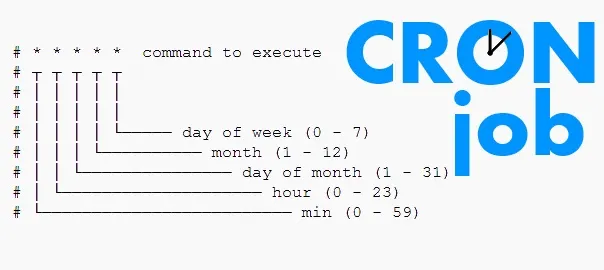
A well-structured cron job should plug into the existing configuration system of your application. For example, in our ETF management app, the cron job schedule is defined in the configuration as:
# Cron job configuration
cron:
  quotes_crontab: "0 23 * * 1-5"  # Run at 11 PM Monday to Friday (excluding weekends)
This configuration allows the application to fetch ETF quotes every weekday at 11 PM. By using a configuration-driven approach, you can easily modify schedules without changing code.
For more on managing Python application configuration with Pydantic, see my previous article: Managing Application Configuration in Python with Pydantic Settings.
The cron job will automatically read the schedule from the configuration key quotes_crontab and fall back to a default value if none is provided. This makes your application flexible and environment-independent.
The Generic CronJob Class
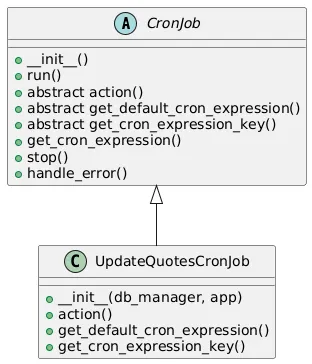
At the core of this approach is a generic base class (core/cronjob.py) that provides the structure for running periodic tasks with configurable intervals. Instead of duplicating scheduling, logging, and error handling in every job, extend this class and implement your task-specific logic.
Here are the key components:
Initialization (init)
Sets up a logger and a background scheduler using APScheduler. It also attaches a listener for job errors, so all exceptions during execution are automatically logged.
self._logger = LoggerManager.get_logger(name=self.__class__.__name__)
self._scheduler = BackgroundScheduler()
self._scheduler.add_listener(callback=self.handle_error, mask=EVENT_JOB_ERROR)
run() Method
Starts the cron job using the configured schedule. It reads the cron expression from configuration (with a default fallback), creates a CronTrigger, schedules the task, and starts the background scheduler.
cron_expression: str = self.get_cron_expression()
trigger: CronTrigger = CronTrigger.from_crontab(cron_expression)
self._scheduler.add_job(func=self.action, trigger=trigger)
self._scheduler.start()
Abstract Methods (action(), get_default_cron_expression(), get_cron_expression_key())
Subclasses must implement these methods:
@abstractmethod
def action(self) -> None:
    """Define the job's task."""
    pass
action()defines the task to execute.get_default_cron_expression()provides a default schedule.get_cron_expression_key()tells the class which configuration key to use for this job.
Configuration Integration (get_cron_expression())
Retrieves the cron expression from the app’s configuration and validates it. If the expression is invalid, it falls back to the default schedule.
settings: Settings = get_settings()
cron_expression: str = getattr(
    settings.cron, cron_expression_key, default_cron_expression
)
Error Handling (handle_error())
Logs any exceptions raised during job execution, including details about the job itself.
def handle_error(self, event: JobEvent) -> None:
    exception = getattr(event, "exception", None)
    job = self._scheduler.get_job(event.job_id) if hasattr(event, "job_id") else None
Stopping the Scheduler (stop())
Allows graceful shutdown of the cron job.
self._scheduler.shutdown()
self._logger.info(f"{self.__class__.__name__} stopped.")
Why this design matters
- Flexible Scheduling: Easily adjust schedules via configuration without touching code.
- Validation: Ensures only valid cron expressions are used.
- Background Execution: Jobs run in their own thread, non-blocking for the main app.
- Centralized Logging and Error Handling: Makes monitoring and debugging straightforward.
- Extensibility: Add new jobs by subclassing and implementing a few methods.
Example: ETF Quote Update Cron Job
In our ETF management app, we implement a specific cron job to update ETF quotes daily. It inherits from the generic CronJob class, so most of the scheduling, logging, and error handling is already handled.
Initialization (init)
The constructor sets up database and service instances, and stores the Flask application context so the job can safely access the app’s resources:
def __init__(self, db_manager: DatabaseManager, app: Flask) -> None:
    super().__init__()
    self.db_manager = db_manager
    self.app = app
    self.quote_service = QuoteService(db_manager=db_manager)
    self.etf_service = EtfService(
        db_manager=db_manager, quote_service=self.quote_service
    )
    self._logger.info("UpdateQuotesCronJob initialized")
This ensures that every time the job runs, it can interact with the database and services in the proper Flask context.
The action() Method
The action() method contains the task logic: updating ETF quotes. It runs inside the Flask application context and logs successes, failures, or exceptions:
def action(self) -> None:
    self._logger.info("Starting scheduled quote update for all ETFs...")
    try:
        with self.app.app_context():
            result = self.etf_service.update_all_etf_quotes()
            if result["success"]:
                self._logger.info(
                    f"{result['success_count']}/{result['total']} ETFs updated successfully."
                )
            else:
                self._logger.warning(
                    f"{result['success_count']} success, {result['failed_count']} failed."
                )
    except Exception as e:
        self._logger.exception(f"Unexpected error during quote update: {str(e)}")
By delegating the update to EtfService, the cron job remains focused on scheduling rather than the business logic itself.
Default Schedule
The cron expression is defined with a default schedule (11 PM, Monday–Friday), but can be overridden in the configuration:
def get_default_cron_expression(self) -> str:
    return "0 23 * * 1-5"


def get_cron_expression_key(self) -> str:
    return "quotes_crontab"
This allows flexible configuration through the app settings, as explained in the configuration section of this article.
The resulting job runs daily at 11 PM on weekdays, executes within the Flask context for safe database and service access, logs successes, failures, and unexpected exceptions, and uses the base CronJob class for all scheduling and error management.
Conclusion
In this article we covered:
- how a generic
CronJobbase class centralises scheduling, logging, and error handling so subclasses stay focused on business logic - how to drive the cron schedule from your application’s configuration with a safe fallback default
- how
BackgroundSchedulerruns jobs in a separate thread without blocking the main application - how to integrate the job with a Flask application context for safe database and service access
- how
UpdateQuotesCronJobapplies this pattern to a real ETF data-update workflow
In the next article we will build the database layer of the application: Building a Database Layer in Python with SQLAlchemy ORM.
If you enjoyed this article, don’t forget to give it a clap 👏, share it with your friends 🔗, and follow me for more tips and tutorials on software development 📘. Your support helps me create more content like this — thank you! 🙌