How to Set Up Your Next Python Project
Posted on 08 Nov 2025

Introduction
Starting a new Python project might look simple — install Python, add a few packages, and start coding. But as your project grows, small early decisions can quickly turn into big problems: version mismatches, dependency hell, inconsistent environments, or missing tooling.
You should read this article if:
- you want to stop wasting time on project setup and start with a proven, repeatable blueprint
- you need a clear comparison of the main Python package managers (pip, Poetry, uv) and their trade-offs
- you want your project to enforce code quality, testing, and security from day one
From experience, most Python projects face the same seven challenges:
- Python Version Enforcement — not all Python versions are compatible; pinning a specific version avoids breakages across environments.
- Virtual Environment Management — each project should be isolated to prevent dependency conflicts.
- Reproducible Environments — “it works on my machine” happens when dependencies aren’t locked properly.
- Dependency Management — deciding whether to list only direct dependencies or lock all transitive ones affects both reproducibility and flexibility.
- Development Tool Integration — linters, type checkers, and security tools should be unified to maintain consistent code quality.
- Separating Development and Production Dependencies — development-only tools should stay out of your production builds.
- Packaging and Distribution — a good setup makes it easy to publish and reuse your code as packages or shared libraries.
Instead of solving these problems from scratch every time, you can start from a clean, opinionated blueprint that already includes the right setup.
The Python Blueprint repository gives you:
- uv as the package manager — fast, reproducible, and version-aware
- pre-configured pre-commit hooks for formatting, linting, typing, and security
- and a step-by-step guide to help you start coding immediately
This saves hours of setup time and ensures your next Python project follows best practices from day one.
Three Approaches to Setting Up a Python Project
There’s no one-size-fits-all way to start a Python project. Based on experience, I usually consider three main approaches — depending on project size, team setup, and production needs.
pip + requirements.txt + tools
The classic, minimal setup — ideal for small scripts or personal prototypes.
Pros:
- Simple, fast, and widely understood
- Great for quick experiments or proofs of concept
Cons:
- No Python version enforcement
- Non-reproducible builds without a lock file
- Manual setup for linters and type checkers
- Separate files for dev vs prod dependencies
When to use: small or personal projects where simplicity matters more than reproducibility.
Poetry + pyenv
A well-established workflow for professional, team-based, or production-ready projects.
Pros:
- Pin exact Python versions via pyenv
- Single configuration (pyproject.toml)
- Reproducible builds with lock files
- Integrated support for linting, typing, and security tools
- Mature and stable ecosystem
When to use: projects requiring reproducibility, collaboration, and deployment consistency.
uv
A modern, Rust-based package manager aiming to unify dependency management, environment isolation, and Python version control.
Pros:
- Built-in Python version handling
- Fast dependency resolution and installs
- Supports workspaces and lock files
- Blazing performance
Cons:
- Still maturing; ecosystem less extensive than Poetry
- Teams may need to adapt existing workflows
When to use: new projects where speed and simplicity are top priorities.
Other Tools
Alternatives like Pipenv, Conda, Flit, PDM, and Hatch exist. Among them, Hatch stands out for its modern, all-in-one design, handling environments, dependencies, and tooling integration in one place.
Choosing the Right Package Managers for Your Needs
Here’s how each setup addresses the most common challenges in Python project management:
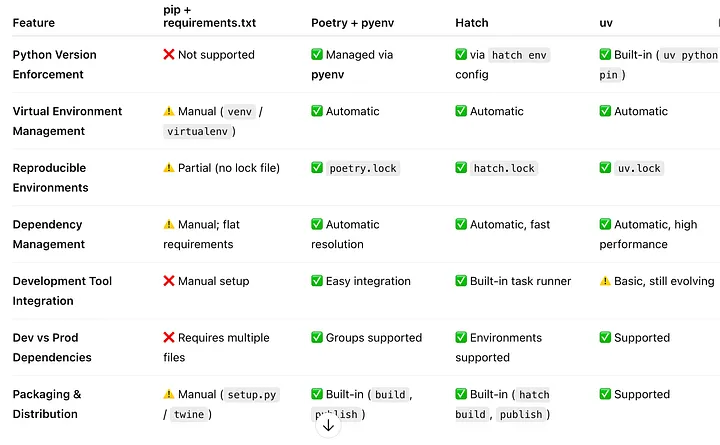 Summary table of Pros and Cons for Python package manager tools
My Take
For small experimental projects, I still use pip — it’s simple and doesn’t get in the way. For larger or team projects, Poetry remains the most mature and reliable choice. But lately, I’ve switched to uv for new work: it manages Python versions without extra tools and its speed is simply impressive.
Choosing the Right Development and Security Tools
Once your environment is set up, the next step is ensuring your codebase remains clean, consistent, and secure. Python offers several tools to automate code quality, style enforcement, and static analysis.
Code Style & Formatting
- Black — The “uncompromising” code formatter. It enforces a single, opinionated style, eliminating debates over formatting.
- Flake8 — A linter that detects style issues and potential bugs, combining PyFlakes, pycodestyle, and McCabe complexity checks.
- isort — Automatically sorts and groups imports to keep them tidy and consistent.
These three tools — Black, Flake8, and isort — ensure the entire codebase looks as if it was written by the same person, improving readability and maintainability. There are other useful tools you can use in your setup: check-yaml, check-json, check-toml, check-added-large-files, check-case-conflict, check-merge-conflict, end-of-file-fixer, trailing-whitespace, pyupgrade, remove-tabs, forbid-crlf.
Note: I follow all PEP8 guidelines, with one exception — I prefer a maximum line length of 120 characters instead of 80. This provides better readability in modern editors while keeping code clean and structured.
Type Checking
- mypy — Performs static type checking, enforcing type hints at development time. It helps catch logical errors before code reaches production.
Security & Static Analysis
- Bandit — Scans Python source code for common security issues like unsafe function calls, injection points, or hardcoded credentials.
- detect-secrets — Detects accidentally committed secrets (API keys, passwords, etc.) in your repository.
- Coverage.py — Measures test coverage of your code. Running tests through Coverage.py ensures that critical code paths are exercised and highlights untested areas.
- Radon — Measures code complexity and maintainability. Helps identify overly complex functions or modules, guiding refactoring efforts.
- pre-commit — A framework for managing and maintaining multi-language pre-commit hooks. It ensures that all developers automatically run formatters, linters, and security checks before committing code, reducing human error and maintaining code quality consistently across the team.
Integrating these tools in your CI/CD pipeline allows you to catch style, type, and security issues early — keeping your codebase both consistent and safe.
To enforce these checks automatically at the developer level, pre-commit can be used to integrate all your tools into Git hooks. With pre-commit, every time a commit is made, code is automatically checked and formatted according to your defined rules. This ensures that only code that passes style, linting, type checking, and security scans is committed, reducing human error and maintaining a consistently high-quality codebase across the team.
For example, you can configure pre-commit to run Black, Flake8, isort, Mypy, Bandit, detect-secrets, and Coverage checks before every commit, making adherence to your standards automatic and invisible to developers.
Unit Testing in Python
Testing is a crucial part of any professional Python project. A solid testing setup ensures that changes don’t break existing functionality and helps maintain high code quality over time.
Built-in Testing with unittest
Python comes with a built-in testing framework called unittest. It allows you to:
- Define test cases as classes inheriting from
unittest.TestCase. - Organize tests with setup (
setUp) and teardown (tearDown) methods. - Run tests directly from the command line without extra installation.
Example:
import unittest


def add(a, b):
    return a + b


class TestMath(unittest.TestCase):
    def test_add(self):
        self.assertEqual(add(2, 3), 5)
        self.assertNotEqual(add(2, 2), 5)


if __name__ == "__main__":
    unittest.main()
Enhanced Output with pytest
While unittest is sufficient for writing and running tests, pytest greatly improves the readability of test output and adds additional features:
- Clean and detailed test reporting.
- Powerful fixtures to manage test setup and dependencies.
- Easy test discovery (no need to subclass TestCase).
- Compatibility with unittest test cases — you can run your existing unittest tests using pytest to get enhanced output.
Example:
# Run all tests and see a detailed summary
pytest -v
Measuring Coverage with coverage.py
To ensure your tests are actually exercising the code, use coverage.py to measure which lines and branches are tested:
coverage run -m pytest
coverage report -m
This helps identify untested parts of your codebase. However, aiming for 100% coverage is rarely practical — some code paths (like error handling or logging) may not need exhaustive testing. Instead, focus on critical and high-risk areas, such as core business logic and external API interactions.
Recommended Workflow
In practice, a common workflow is:
- Write tests with unittest — no extra dependencies, consistent and embedded in Python.
- Run tests with pytest — for better reporting, easier debugging, and advanced features.
This approach builds on the stability of Python’s built-in framework while taking advantage of the modern enhancements offered by pytest.
Mastering Version Control with Git
When it comes to version control, Git is the de facto standard in modern software development. Its flexibility, distributed nature, and wide ecosystem make it the natural choice for both open-source and enterprise projects.
However, in medium to large teams, the real challenge isn’t choosing Git — it’s using it effectively. Many developers only know the basics (clone, commit, push, pull), which often leads to confusion, messy histories, and merge conflicts.
The root cause is that Git is used as a list of commands rather than understood as a data model. Knowing how commits, branches, and references actually work makes all the difference. I explored this in detail in this guide:
👉 Beyond Push and Pull: Understanding Git’s Core Concepts to Avoid Common Pitfalls
Once you grasp Git’s internals, defining an effective Git workflow becomes much simpler. My recommended approach for structuring branches, managing releases, and improving collaboration is described here:
👉 The Hidden Challenges of Git: Lessons from Working in Large Projects
Update: Since writing this article, I have fully replaced Black, Flake8, and isort with Ruff — a blazing-fast Python linter and formatter developed by Astral, the same company behind uv. Ruff consolidates all three tools into a single binary, runs 10–100× faster, and requires only one configuration block in pyproject.toml. If you are starting a new project today, I recommend going straight to Ruff instead of the three-tool setup described above.
Conclusion
In this article we covered:
- the seven common challenges every Python project faces and how to address them from the start
- a comparison of three main setup approaches: pip, Poetry + pyenv, and uv
- the key tools for code quality: Black, Flake8, isort (or Ruff as a modern all-in-one replacement), mypy, Bandit, detect-secrets, and pre-commit
- how to structure a testing workflow with unittest, pytest, and coverage.py
- why mastering Git’s internals makes the difference in team projects
Setting up a Python project is much more than just installing dependencies and writing code. It’s about building a sustainable development environment — one that enforces consistency, encourages collaboration, and minimizes friction as the project grows.
A clean environment, a consistent style, meaningful tests, and a solid Git strategy are the cornerstones of professional Python development. Once these foundations are in place, you can focus on what really matters — delivering value through great code.
If you found this article useful, consider using the python-boilerplate template as a starting point for your next project and adapting it to your team’s workflow.
If you enjoyed this article, don’t forget to give it a clap 👏, share it with your friends 🔗, and follow me for more tips and tutorials on software development 📘. Your support helps me create more content like this — thank you! 🙌