
Async and the Event Loop in Python: asyncio in Practice
Posted on 13 Sep 2026

Introduction
The previous article covered the theory: the GIL, thread pools, process pools, and why the event loop beats them all for I/O-bound concurrency at scale. Theory is useful until you sit down to write something real.
This article builds a concrete project from scratch — an async news aggregator that fetches RSS feeds concurrently and formats a digest ready to send via WhatsApp. The code is the same used in the open-source Alfred project: it starts minimal and grows with one new pattern per section: gather, TaskGroup, asyncio.timeout, Semaphore, and format_news. By the end you have a working, production-grade async application and a clear mental model of when and why to reach for each tool.
You should read this article if:
- You understand the theory of
asynciobut have not yet built something real with it. - You want to see
TaskGroup,Semaphore, andasyncio.timeoutused together in a single project rather than in isolation. - You are comfortable with Python but new to
aiohttpand concurrent I/O patterns.
This article is part of the Modern Python Application series.
The Project: An Async News Aggregator
The aggregator in this article is based on the news.py module from the open-source Alfred project — a personal assistant that fetches daily news and delivers it via WhatsApp. The article walks through the same patterns the real module uses, introducing them one step at a time. The final section points out where the production code goes further.
The aggregator fetches headlines from five RSS sources — the same default feeds configured in Alfred:
| Source | Category | URL |
|---|---|---|
| BBC News | International | https://feeds.bbci.co.uk/news/world/rss.xml |
| Repubblica | National | https://www.repubblica.it/rss/homepage/rss2.0.xml |
| Wired | Technology | https://www.wired.com/feed/rss |
| Sky Sport | Sport | https://sport.sky.it/rss/sport.xml |
| Science Daily | Science | https://www.sciencedaily.com/rss/top/science.xml |
The final output is a formatted text digest ready to be sent via WhatsApp, with each item showing title and a short summary stripped of HTML.
Install the dependencies first:
pip install aiohttp feedparser
aiohttp— async HTTP client; see the aiohttp documentation for the full API referencefeedparser— synchronous RSS/Atom/RDF parser; we feed it raw XML already in memory; see the feedparser documentation for the full entry field reference
Step 1 — One Feed, One Coroutine
Start with the simplest possible version: fetch a single RSS feed and parse it. The real Alfred module also strips HTML from each entry’s summary — let’s include that from the start, since it is a two-liner and avoids HTML noise in the output.
# news.py
import asyncio
import re

import aiohttp
import feedparser

TIMEOUT = aiohttp.ClientTimeout(total=10)
HEADERS = {"User-Agent": "Mozilla/5.0 (compatible; AlfredBot/1.0)"}
MAX_SUMMARY = 150


def _strip_html(text: str) -> str:
    """Remove HTML tags, collapse whitespace, and truncate to MAX_SUMMARY chars."""
    clean = re.sub(r"\s+", " ", re.sub(r"<[^>]+>", "", text)).strip()
    return clean[:MAX_SUMMARY] + "…" if len(clean) > MAX_SUMMARY else clean


async def fetch(session: aiohttp.ClientSession, url: str, limit: int = 3) -> list[dict]:
    async with session.get(url) as resp:
        resp.raise_for_status()
        text = await resp.text()
    feed = feedparser.parse(text)
    return [
        {
            "title": e.get("title", "").strip(),
            "link": e.get("link", ""),
            "summary": _strip_html(e.get("summary", "")),
        }
        for e in feed.entries[:limit]
    ]

async def main() -> None:
    async with aiohttp.ClientSession(timeout=TIMEOUT, headers=HEADERS) as session:
        items = await fetch(session, "https://feeds.bbci.co.uk/news/world/rss.xml")
    for item in items:
        print(item["title"])
        print(item["summary"])

asyncio.run(main())
A few things worth noting:
HEADERSsets aUser-Agentstring. Many RSS servers silently return403for requests that look like bots without a recognisable user agent — this one-liner prevents that class of failure entirely.aiohttp.ClientSessionis created once and reused for all requests. Creating a session per request is the most commonaiohttpmistake — it bypasses connection pooling entirely. One session per application is the rule.ClientTimeout(total=10)sets a 10-second cap on the full operation. Without a timeout, a hanging feed hangs your entire program indefinitely.feedparser.parse(text)is synchronous but runs in microseconds once the XML is already in memory — no need to offload it to a thread.resp.raise_for_status()raisesaiohttp.ClientResponseErrorfor any 4xx or 5xx response immediately, rather than letting malformed data propagate silently._strip_html()removes HTML tags from the summary using two regex passes: first strips tags, then collapses whitespace. The truncation atMAX_SUMMARYchars keeps WhatsApp messages readable.
A coroutine object does nothing until it is awaited.
fetch(session, url)returns a coroutine — the HTTP request only fires when the event loop reachesawait.
Step 2 — Multiple Feeds with asyncio.gather
Fetching feeds one by one defeats the purpose of async. asyncio.gather runs multiple coroutines concurrently — all five requests are in-flight simultaneously, and the total wall time equals the slowest single response, not the sum.
DEFAULT_FEEDS = {
    "BBC News":      "https://feeds.bbci.co.uk/news/world/rss.xml",
    "Repubblica":    "https://www.repubblica.it/rss/homepage/rss2.0.xml",
    "Wired":         "https://www.wired.com/feed/rss",
    "Sky Sport":     "https://sport.sky.it/rss/sport.xml",
    "Science Daily": "https://www.sciencedaily.com/rss/top/science.xml",
}

async def main() -> None:
    async with aiohttp.ClientSession(timeout=TIMEOUT, headers=HEADERS) as session:
        results = await asyncio.gather(
            *[fetch(session, url) for url in DEFAULT_FEEDS.values()],
            return_exceptions=True,
        )
    for source, result in zip(DEFAULT_FEEDS.keys(), results):
        if isinstance(result, Exception):
            print(f"{source}: error — {result}")
        else:
            for item in result:
                print(f"[{source}] {item['title']}")
return_exceptions=True is the key choice here. Without it, the first failed feed raises immediately and you lose all results. With it, exceptions are returned as values alongside successful results — you check isinstance(result, Exception) and continue. This is the right default for an aggregator where partial results are genuinely useful.
The limitation: if one feed fails, the others keep running regardless. There is no automatic cancellation. That is sometimes what you want (independent sources) and sometimes not (a batch of dependent requests where partial data is useless). The next section shows the alternative.
Step 3 — Structured Concurrency with TaskGroup
asyncio.TaskGroup (Python 3.11+, see the official docs) enforces a stricter contract: if any task raises an unhandled exception, all siblings are cancelled and an ExceptionGroup is raised at the async with exit. Think of it as gather with a safety net (here, that safety net never triggers — fetch_safe absorbs every exception internally before TaskGroup can see it).
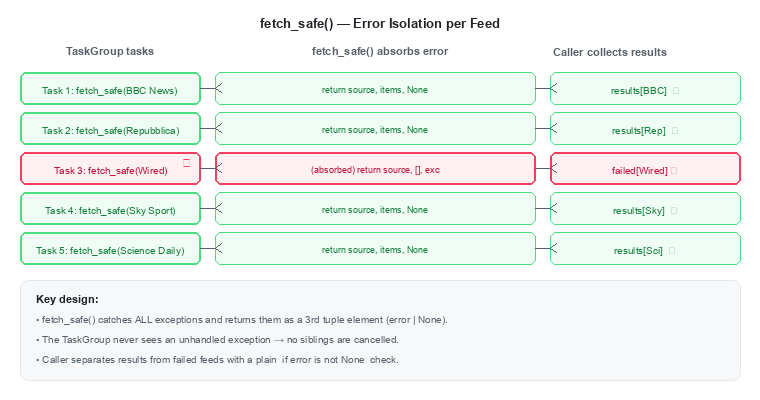
For the aggregator, feeds are independent sources — a failure in one should not kill the others. The right pattern here is to absorb errors inside fetch_safe and return them as a third tuple element, then let TaskGroup manage the concurrency cleanly:
async def fetch_safe(
    session: aiohttp.ClientSession,
    source: str,
    url: str,
    limit: int = 3,
) -> tuple[str, list[dict], Exception | None]:
    try:
        items = await fetch(session, url, limit=limit)
        return source, items, None
    except Exception as exc:
        return source, [], exc

async def main() -> None:
    results: dict[str, list[dict]] = {}
    failed: dict[str, Exception] = {}

    async with aiohttp.ClientSession(timeout=TIMEOUT, headers=HEADERS) as session:
        async with asyncio.TaskGroup() as tg:
            tasks = {
                source: tg.create_task(fetch_safe(session, source, url))
                for source, url in DEFAULT_FEEDS.items()
            }

    for source, task in tasks.items():
        _, items, error = task.result()
        if error is not None:
            failed[source] = error
        else:
            results[source] = items
tg.create_task() schedules each coroutine as a Task immediately. The async with block does not exit until all tasks are complete — no manual await for each one. The tasks dictionary gives you named access to each result after the group closes.
Notice that fetch_safe now returns a 3-tuple (source, items, error | None) instead of mixing exceptions and data in a single list. The error travels alongside the result as a first-class field — the caller unpacks it cleanly with _, items, error = task.result() and routes failures to a separate failed dict without any isinstance check.
Use
TaskGroupwhen you want structured lifetimes for a set of concurrent tasks. Usegather(return_exceptions=True)when you need to collect all results including errors as data.
As Hynek Schlawack notes, TaskGroup is now the recommended default for scheduling a nested group of tasks — it has fewer sharp edges than gather and its cancellation semantics are unambiguous.
Step 4 — Per-Request Timeouts with asyncio.timeout
The global ClientTimeout covers the session default, but individual feeds can be slower or faster. asyncio.timeout (Python 3.11+) wraps any block of async code with a deadline — if the block takes longer than n seconds, it raises TimeoutError and cancels the inner task cleanly.
async def fetch_safe(
    session: aiohttp.ClientSession,
    source: str,
    url: str,
    timeout: float = 8.0,
    limit: int = 3,
) -> tuple[str, list[dict], Exception | None]:
    try:
        async with asyncio.timeout(timeout):
            items = await fetch(session, url, limit=limit)
        return source, items, None
    except TimeoutError as exc:
        return source, [], exc
    except Exception as exc:
        return source, [], exc
asyncio.timeout is more composable than asyncio.wait_for — it is an async context manager that wraps a block rather than a single coroutine call. This means you can cover multiple await expressions with a single deadline, which is useful when a feed requires a follow-up request to resolve redirects.
One important rule: TimeoutError must be caught outside the async with asyncio.timeout(...) block, not inside it. The context manager converts the internal CancelledError into TimeoutError at its exit — catching it inside would swallow it before the conversion.
Step 5 — Rate Limiting with asyncio.Semaphore
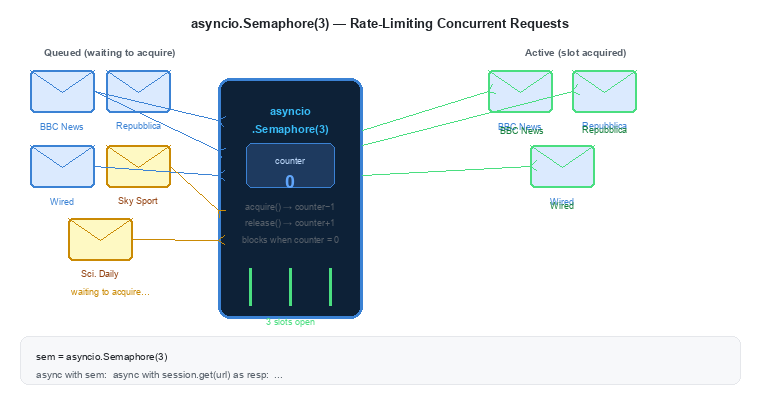
Five feeds is manageable, but extend this to 50 sources and you risk triggering rate limits or overwhelming slow servers with a burst of simultaneous connections. asyncio.Semaphore is a counter that limits how many coroutines can be inside a critical section at the same time.
async def fetch_safe(
    session: aiohttp.ClientSession,
    source: str,
    url: str,
    semaphore: asyncio.Semaphore,
    timeout: float = 8.0,
    limit: int = 3,
) -> tuple[str, list[dict], Exception | None]:
    async with semaphore:  # acquire slot; blocks if all slots are taken
        try:
            async with asyncio.timeout(timeout):
                items = await fetch(session, url, limit=limit)
            return source, items, None
        except TimeoutError as exc:
            return source, [], exc
        except Exception as exc:
            return source, [], exc


async def _fetch_all(
    feeds: dict[str, str], limit: int = 3
) -> tuple[dict[str, list[dict]], dict[str, Exception]]:
    semaphore = asyncio.Semaphore(3)
    results: dict[str, list[dict]] = {}
    failed: dict[str, Exception] = {}

    async with (
        aiohttp.ClientSession(timeout=TIMEOUT, headers=HEADERS) as session,
        asyncio.TaskGroup() as tg,
    ):
        tasks = {
            source: tg.create_task(fetch_safe(session, source, url, semaphore, limit=limit))
            for source, url in feeds.items()
        }

    for source, task in tasks.items():
        _, items, error = task.result()
        if error is not None:
            failed[source] = error
        else:
            results[source] = items

    return results, failed
The semaphore wraps the entire request block including the timeout. When three tasks are already inside, the fourth async with semaphore: suspends at acquire() — the event loop runs other work while it waits. As soon as one of the active tasks exits the block, the semaphore releases a slot and the waiting task resumes.
The _fetch_all helper wraps everything: it creates the semaphore, opens the session and the TaskGroup together using a parenthesised async with block (Python 3.10+), spawns one task per feed, then collects results into results and failed dicts. Returning both separately is cleaner than mixing exceptions and data in a single list — the caller sees clean items and can act on errors independently.
asyncio.Semaphoreis not thread-safe. Use it only inside a single event loop — never across threads.
Step 6 — Formatting the Digest with format_news
All the data is now in results. The last step before delivery is turning it into a human-readable string — one that WhatsApp can render with bold headers and bullet points using its own Markdown-like syntax.
def format_news(results: dict[str, list[dict]]) -> str:
    blocks: list[str] = []
    for source, items in results.items():
        if not items:
            continue
        lines: list[str] = [f"*{source}*"]
        for item in items:
            lines.append(f"• {item['title']}")
            if item.get("summary"):
                lines.append(f"  {item['summary']}")
        blocks.append("\n".join(lines))
    if not blocks:
        return ""
    return "📰 *Ultime Notizie*\n\n" + "\n\n".join(blocks)
format_news is a plain synchronous function — no async, no await. By the time it runs, all the I/O is done and results is already in memory. This is the right pattern: keep async code to the network and disk boundary, and let everything else be normal Python.
*source*produces bold text in WhatsApp.• item['title']is a bullet item.- The summary line is indented with two spaces and shown only when non-empty.
- Sources with zero items are skipped entirely.
The Complete Aggregator
Putting all the pieces together — this is the full news.py module from Alfred, with DEFAULT_FEEDS hardcoded for readability:
# news.py
import asyncio
import re

import aiohttp
import feedparser

TIMEOUT = aiohttp.ClientTimeout(total=10)
HEADERS = {"User-Agent": "Mozilla/5.0 (compatible; AlfredBot/1.0)"}
MAX_SUMMARY = 150

DEFAULT_FEEDS = {
    "BBC News":      "https://feeds.bbci.co.uk/news/world/rss.xml",
    "Repubblica":    "https://www.repubblica.it/rss/homepage/rss2.0.xml",
    "Wired":         "https://www.wired.com/feed/rss",
    "Sky Sport":     "https://sport.sky.it/rss/sport.xml",
    "Science Daily": "https://www.sciencedaily.com/rss/top/science.xml",
}


def _strip_html(text: str) -> str:
    clean = re.sub(r"\s+", " ", re.sub(r"<[^>]+>", "", text)).strip()
    return clean[:MAX_SUMMARY] + "…" if len(clean) > MAX_SUMMARY else clean


async def fetch(session: aiohttp.ClientSession, url: str, limit: int = 3) -> list[dict]:
    async with session.get(url) as resp:
        resp.raise_for_status()
        text = await resp.text()
    feed = feedparser.parse(text)
    return [
        {
            "title": e.get("title", "").strip(),
            "link": e.get("link", ""),
            "summary": _strip_html(e.get("summary", "")),
        }
        for e in feed.entries[:limit]
    ]


async def fetch_safe(
    session: aiohttp.ClientSession,
    source: str,
    url: str,
    semaphore: asyncio.Semaphore,
    timeout: float = 8.0,
    limit: int = 3,
) -> tuple[str, list[dict], Exception | None]:
    async with semaphore:
        try:
            async with asyncio.timeout(timeout):
                items = await fetch(session, url, limit=limit)
            return source, items, None
        except TimeoutError as exc:
            return source, [], exc
        except Exception as exc:
            return source, [], exc


async def _fetch_all(
    feeds: dict[str, str], limit: int = 3
) -> tuple[dict[str, list[dict]], dict[str, Exception]]:
    semaphore = asyncio.Semaphore(3)
    results: dict[str, list[dict]] = {}
    failed: dict[str, Exception] = {}

    async with (
        aiohttp.ClientSession(timeout=TIMEOUT, headers=HEADERS) as session,
        asyncio.TaskGroup() as tg,
    ):
        tasks = {
            source: tg.create_task(fetch_safe(session, source, url, semaphore, limit=limit))
            for source, url in feeds.items()
        }

    for source, task in tasks.items():
        _, items, error = task.result()
        if error is not None:
            failed[source] = error
        else:
            results[source] = items

    return results, failed


def format_news(results: dict[str, list[dict]]) -> str:
    blocks: list[str] = []
    for source, items in results.items():
        if not items:
            continue
        lines: list[str] = [f"*{source}*"]
        for item in items:
            lines.append(f"• {item['title']}")
            if item.get("summary"):
                lines.append(f"  {item['summary']}")
        blocks.append("\n".join(lines))
    if not blocks:
        return ""
    return "📰 *Ultime Notizie*\n\n" + "\n\n".join(blocks)


async def main() -> None:
    results, failed = await _fetch_all(DEFAULT_FEEDS)

    print(format_news(results))

    if failed:
        print("--- Failed feeds ---")
        for source, error in failed.items():
            print(f"{source}: {error}")


if __name__ == "__main__":
    asyncio.run(main())
Run it:
python news.py
The expected output looks like:
📰 *Ultime Notizie*

*BBC News*
• Article title one
  Short summary of the article…
• Article title two
  Short summary of the article…

*Repubblica*
• ...
How the Event Loop Sees This
Every await in the code above is a yield point — the moment a coroutine suspends and hands control back to the event loop. The diagram below shows what happens with five concurrent fetch(url) calls: the event loop runs all five as tasks of the same coroutine function, each suspended at its own await, each holding a different URL.
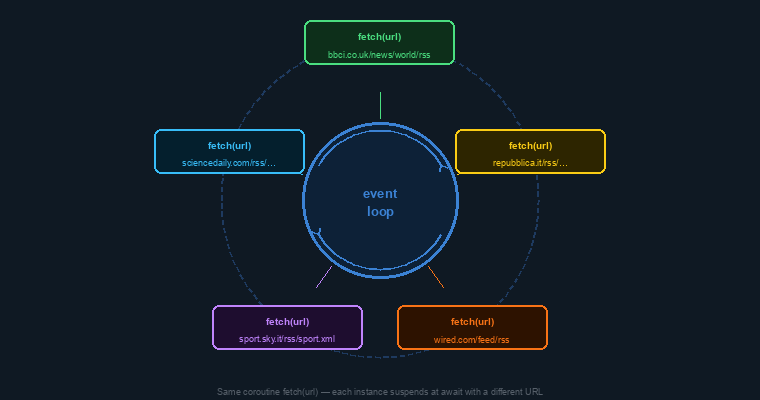
None of the feeds block each other. While fetch(url) for BBC News is waiting for bytes from the BBC server, the event loop resumes fetch(url) for Repubblica, and so on. The total wall time collapses to the latency of the single slowest feed — not the sum of all five.
The event loop does not make individual requests faster. It makes the waiting invisible by running other work while one request is in flight.
Patterns Compared
| Pattern | API | Best for | Cancels siblings on failure? |
|---|---|---|---|
| Sequential | await |
Dependent steps, no concurrency needed | N/A |
| Concurrent, collect all | asyncio.gather(return_exceptions=True) |
Independent tasks, partial results useful | No |
| Structured concurrency | asyncio.TaskGroup |
Independent tasks, clean lifetimes | Yes |
| Deadline | asyncio.timeout |
Any block that must not hang | Yes (inner task) |
| Rate limit | asyncio.Semaphore |
Limiting concurrent access to a resource | No |
| Sync formatting | plain def |
Post-I/O data shaping, no blocking concerns | N/A |
Conclusion
In this article we covered:
- Starting with a single
async def fetch()coroutine, a sharedaiohttp.ClientSession, and a_strip_html()helper to produce clean summaries from the first line. - Adding a
User-Agentheader to avoid silent403rejections from RSS servers that block unrecognised clients. - Fetching multiple feeds concurrently with
asyncio.gather(return_exceptions=True)to collect partial results when some sources fail. - Replacing
gatherwithasyncio.TaskGroupfor structured concurrency with clean task lifetimes, and switchingfetch_safeto a 3-tuple return so errors travel as data rather than exceptions. - Wrapping individual requests with
asyncio.timeoutto enforce per-source deadlines without blocking the event loop. - Using
asyncio.Semaphore(3)and a_fetch_allhelper with a parenthesisedasync withblock to cap concurrent connections and keep the call site clean. - Converting the results dict to a WhatsApp-ready string with a plain synchronous
format_newsfunction — keeping async code at the I/O boundary and normal Python everywhere else.
The next article starts a three-part mini-series on Python CLI development — building the same Task Manager CLI first with argparse and the Command Pattern, then with Click, then with Typer.
If you enjoyed this article, don’t forget to give it a clap 👏, share it with your friends 🔗, and follow me for more tips and tutorials on software development 📘. Your support helps me create more content like this — thank you! 🙌