Designing REST APIs in Practice: A Kubernetes Case Study
Posted on 16 Sep 2026
Introduction
In the previous installments of this series, we explored CLI application patterns with Click and Typer. While CLI interfaces offer a convenient way for developers to interact with services locally, building distributed applications requires exposing services over the network via structured HTTP interfaces.
When designing a REST API, engineers often focus on choosing the “right” framework — FastAPI, Spring Boot, and so on. Tools matter, but they solve only the implementation detail. The real challenge is designing an API that reflects the business domain, exposes domain entities as resources, and uses HTTP semantics consistently, including errors and status codes.
Think of an API as a contract between two systems. As the designer of this contract, you act like a notary, carefully drafting the terms of interaction. However, this contract must follow the rules of HTTP, ensuring it adheres to the standard conventions for communication.
The first step is to identify the entities involved in the contract. Once these entities are clear, the next step is to define the rules: what operations can be performed on each entity, and under what conditions, all while respecting the HTTP framework.
A good API should be intuitive, self-describing, and coherent with the domain. This requires identifying business entities, their lifecycle, and their relationships before thinking about technology. Once the domain model is clear, the API becomes almost a direct consequence of it.
To avoid remaining purely theoretical, we will use Kubernetes as a case study. It provides a concrete example where functional requirements naturally lead to entities and operations that are directly exposed through an HTTP interface.
You should read this article if:
- You are designing or refactoring a REST API and want a rigorous, entity-driven methodology.
- You want to understand how domain concepts translate into REST resources, HTTP methods, and status codes.
- You want to see how Kubernetes models its complex architecture cleanly using standard REST conventions.
From requirements to entities: the logical model of Kubernetes
In a Clean Architecture perspective, the design process begins from the inside: entities at the center, then use cases, then the external interfaces.
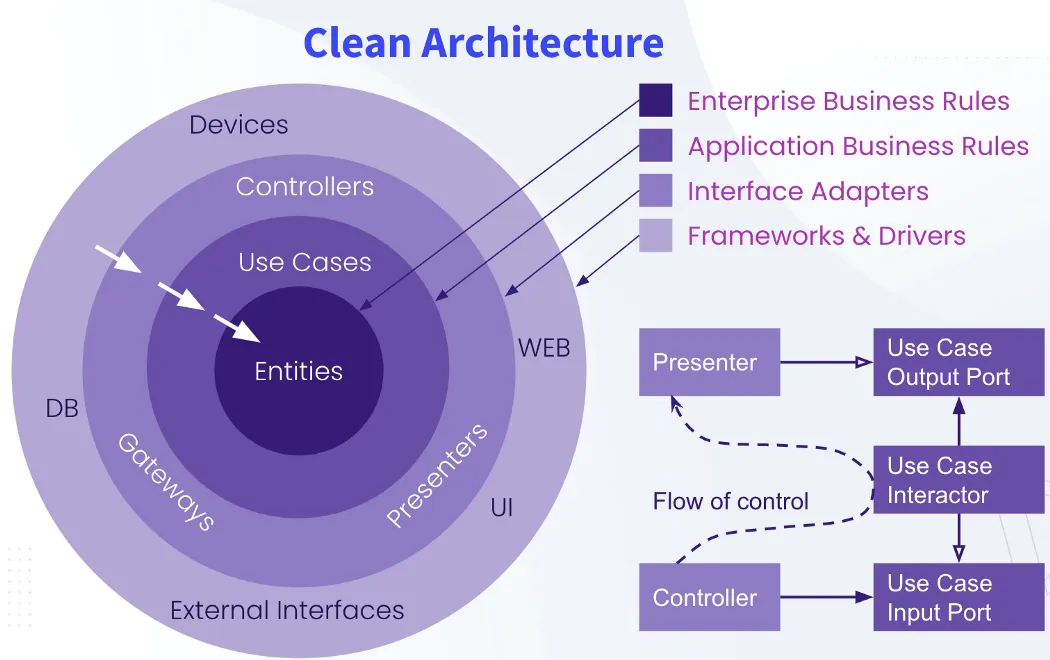 Clean Architecture Main Concepts
User stories play a fundamental role here. They describe what the system must accomplish from a business perspective, and in doing so they implicitly define the domain language: the nouns in the stories become the entities of the domain, while the verbs describe the operations and relationships between them.
Kubernetes is no exception. Its functional requirements — scheduling workloads, distributing containers, maintaining stable network access, scaling services, enforcing security boundaries — naturally give rise to a set of domain entities. These entities exist independently of any API design choice; the API merely exposes them.
In this section, I assume the requirements of Kubernetes are already known and focus directly on their consequences: the entities that form the system and the relationships between them.
Resource entities
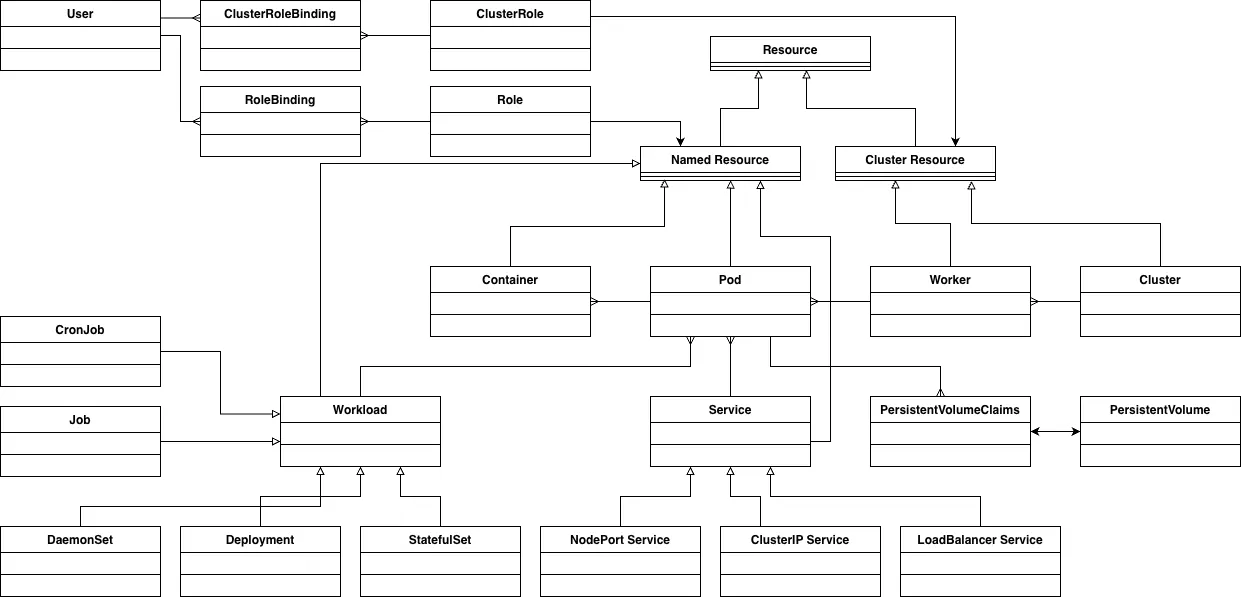 Kubernetes Entities with their Relationships
In Kubernetes everything is a Resource. Conceptually, Kubernetes exposes two main categories of resources:
- Namespaced resources — exist within a specific namespace
- Cluster-scoped resources — global across the entire cluster
Although the “cluster” itself is not a first-class API object, we can treat it as the top-level element for reasoning about relationships.
- A cluster consists of one or more nodes or workers.
- Each node runs one or more *Pods+.
- Each Pod contains one or more containers.
Pods are ephemeral and their network identity is unstable. For this reason, Pods are typically exposed through a Service (namespaced resource). Services come in three main variants:
- ClusterIP
- NodePort
- LoadBalancer
Workloads are created and managed by Workload (this concept doesn’t explicitly exist in Kubernetes but it helps us to model the resources). The most common ones are:
- Deployments, used for stateless applications
- StatefulSets, used for stateful applications
- DaemonSets, used to run one Pod instance on every (or selected) node
- Jobs, used for finite, one-off batch operations
- CronJobs, used for scheduled batch workloads
Pods may rely on persistent storage. They reference one or more PersistentVolumeClaims (PVCs), each of which binds to a PersistentVolume (PV) in a one-to-one manner.
Finally, users are not represented by Kubernetes YAML objects but are defined in the Kubernetes configuration (commonly via the kubeconfig file). Users acquire permissions through Roles (namespaced) and ClusterRoles (cluster-scoped). Roles are connected to users through RoleBindings or ClusterRoleBindings, depending on the scope.
Once this entity model is clear, designing a RESTful API becomes almost mechanical. Each entity maps directly to a resource, operations correspond to the entity’s lifecycle, and access control follows from the relationships defined in the domain model.
Defining the Rules of an API
Once we have identified the entities in the system, the next step is to define the rules of interaction between these entities. These rules will dictate how resources can be accessed, manipulated, or deleted via the API. Each rule can be broken down into four main components:
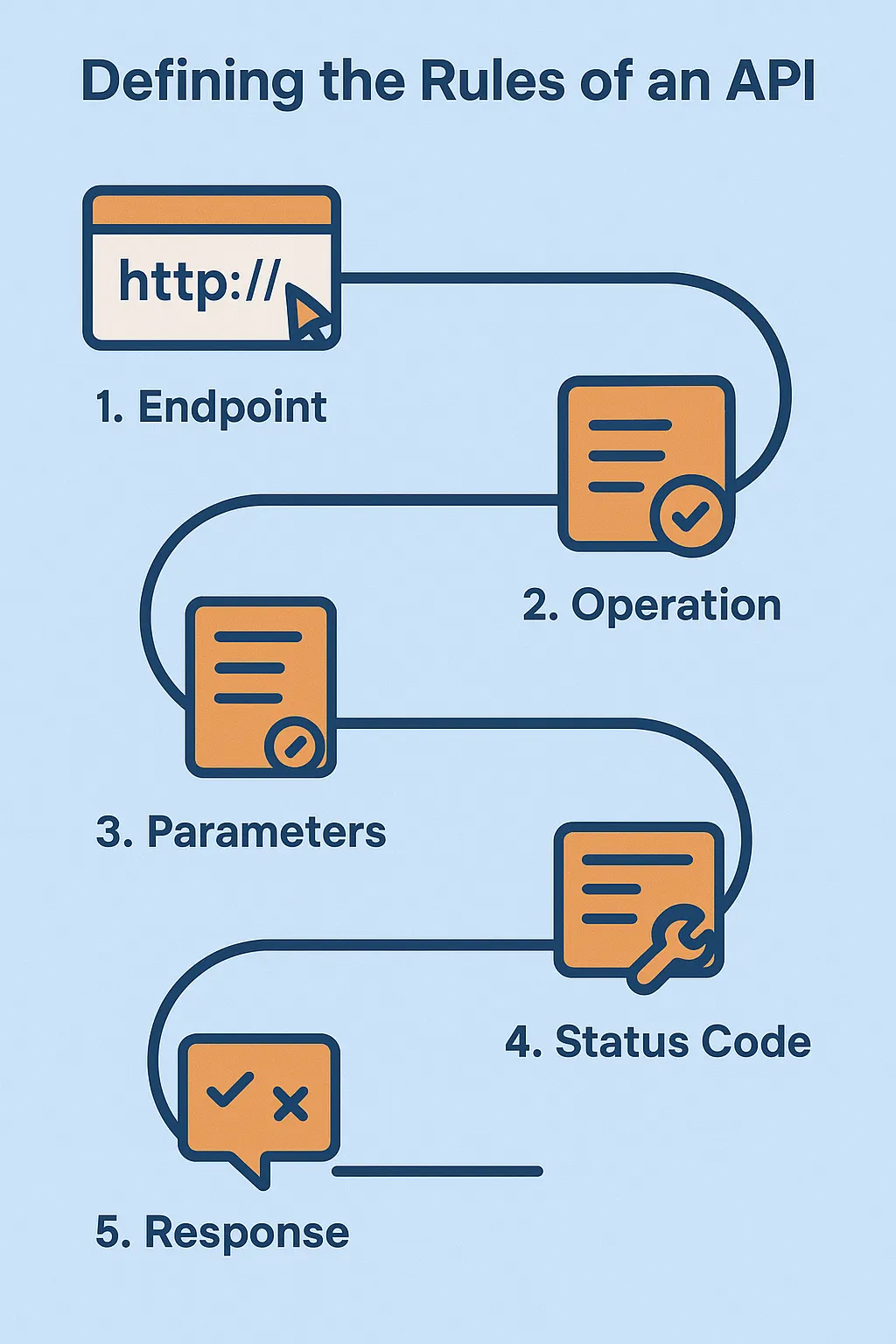 Defining the Rules of an API
1. Endpoint
The endpoint is the URL pattern that maps to the entity and defines the resource’s location. It is the path that the client will use to access the resource or perform an action on it.
A few important principles:
Use plural names for entities:
Even when retrieving a single entity, the resource name in the endpoint should be plural to denote the collection.
Example:
/api/v1/namespaces/{namespace}/pods          # collection of pods
/api/v1/namespaces/{namespace}/pods/{pod_id}  # single pod
Using the plural form consistently improves readability, makes endpoints predictable, and clearly distinguishes between collections and individual entities.
Limit relationship depth to two entities:
When representing relationships between entities in the endpoint, it is recommended to limit the path to two entities (e.g., /api/v1/customers/{customer_id}/employees). Going beyond this introduces unnecessary complexity and can lead to performance issues, as deeper relationships make the endpoint more difficult to manage and can impact scalability. Keeping the representation simple ensures better performance and maintainability.
2. Operation
The operation specifies the action to be performed on the resource. This is determined by the HTTP method used in the request. The most common HTTP methods include:
- GET: Retrieve a resource or a collection of resources. It is idempotent and does not alter the system.
- POST: Create a new resource. Non-idempotent and alters the system.
- PUT: replaces the entire resource representation. Idempotent and alters the system.
- PATCH: Apply partial updates. It may be idempotent, depending on implementation.
- DELETE: Remove a resource. Non-idempotent and alters the system.
Some actions, like restarting a Pod, are not CRUD operations but can be modeled using POST, as they trigger an action on a resource without modifying it directly.
3. Parameters
Parameters define the information needed to execute the operation. There are three types of parameters that can be used:
- URL Parameters: These are part of the endpoint and are typically used to specify the resource’s identity, such as a specific resource ID (e.g.,
/pods/{pod_id}). - Query Parameters: These are appended to the URL to refine or filter the results. They can specify things like pagination, sorting, or specific filters (e.g.,
?limit=10or?status=active). - Body Parameters: These are included in the body of the request and are typically used with methods like POST, PUT, and PATCH. Body parameters allow you to send complex data structures like JSON or XML to define the resource’s state or request changes.
4. Status Code
The status code is the HTTP response code that indicates the result of the operation. Common status codes include:
- 200 OK: The request was successful (used for GET, PUT, DELETE).
- 201 Created: The resource was successfully created (used for POST).
- 400 Bad Request: The request was malformed or invalid.
- 404 Not Found: The resource was not found.
- 405 Method Not Allowed: The requested method (i.e. GET, POST, etc.) has not been implemented for the specified resource.
- 409 Conflict: Conflicting state or rate limit reached.
- 500 Internal Server Error: There was an error on the server side.
- 503 Bad Gateway / Service Unavailable: Usually when a 3rd party subsystem is unavailable.
5. Response
The response is the data returned from the server after processing the request. This can include:
- A representation of the resource (for GET requests).
- A confirmation message (for POST, PUT, or DELETE requests, indicating success or failure).
- A failure message (for errors, explaining what went wrong).
The response should be formatted in a structured and predictable way (typically JSON or XML) so that the client can easily parse and understand the result.
These components — endpoint, operation, parameters, status code, and response — form the backbone of any API rule. By clearly defining these elements, you ensure that the API is intuitive, consistent, and easy to use for clients. These rules are the foundation that will guide how entities interact with each other in a system, ensuring that the API remains predictable, maintainable, and aligned with business needs.
Managing a Pod via API
Since it’s impossible in an article cover the API for all the above mentioned resources, let’s see how to define the API for the Pod resource.
In Kubernetes, these are the typical operations you can perform on a Pod, including both CRUD operations and a non-CRUD action like restarting a Pod.
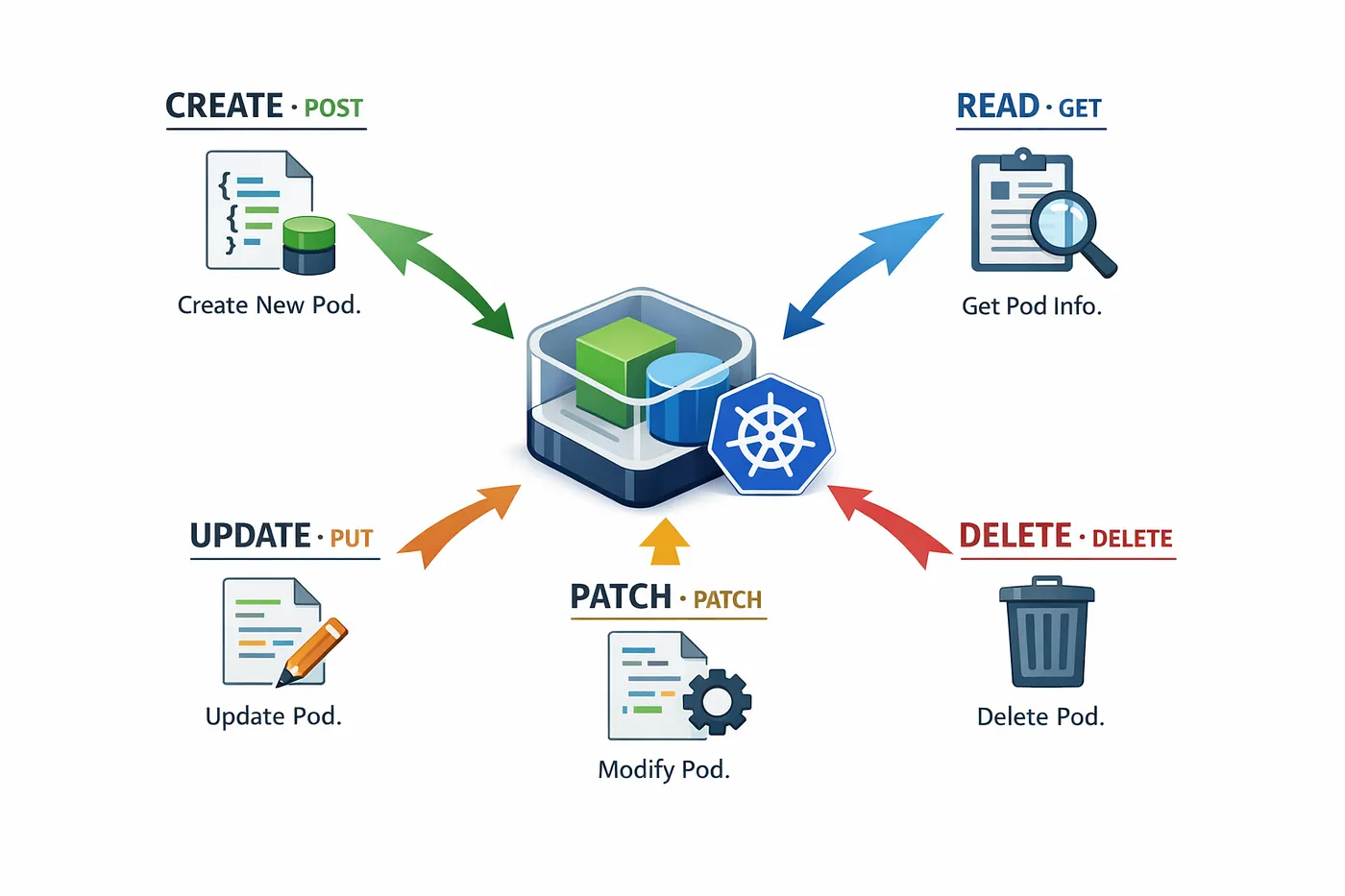 Managing Pod via API
1. CREATE (POST)
- Endpoint:
/api/v1/namespaces/{namespace}/pods - Operation: POST
- Parameters: Body (JSON representation of the Pod specification, equivalent to what would be defined in a YAML file)
- Description: Create a new Pod in the specified namespace. The JSON body contains the Pod definition, including metadata and specification (containers, images, etc.).
- Status Code: 201 Created
- Response: Details of the created Pod.
2. READ (GET)
- Endpoint:
/api/v1/namespaces/{namespace}/pods(to list all Pods in a namespace) or/api/v1/namespaces/{namespace}/pods/{pod_id}(to retrieve a specific Pod) - Operation: GET
- Parameters: URL parameters (
namespace,pod_id), Query parameters (e.g.,?status=running) - Description: Retrieve information about a specific Pod or a list of Pods.
- Status Code: 200 OK
- Response: The Pod’s details (e.g., metadata, status, containers).
3. UPDATE (PUT)
- Endpoint:
/api/v1/namespaces/{namespace}/pods/{pod_id} - Operation: PUT
- Parameters: Body (Updated Pod specification in JSON)
- Description: Replace an existing Pod’s specification with a new one (e.g., updating resources).
- Status Code: 200 OK
- Response: The updated Pod details.
4. PARTIAL UPDATE (PATCH)
- Endpoint:
/api/v1/namespaces/{namespace}/pods/{pod_id} - Operation: PATCH
- Parameters: Body (Partial update, e.g., only changing the labels or annotations).
- Description: Apply partial updates to a Pod’s specification, such as modifying labels, annotations, or other attributes without replacing the entire Pod.
- Status Code: 200 OK
- Response: The updated Pod details.
5. DELETE (DELETE)
- Endpoint:
/api/v1/namespaces/{namespace}/pods/{pod_id} - Operation: DELETE
- Parameters: URL parameters (
namespace,pod_id) - Description: Delete the specified Pod.
- Status Code: 200 OK, 202 Accepted if the deletion is asynchronous, or 204 No Content if the operation is successfully but there is no content in the response.
- Response: Confirmation of deletion.
Authentication and Authorization in APIs (Kubernetes as a Case Study)
In any API, authentication and authorization are critical to ensure that only legitimate users can perform allowed operations on the system’s resources. Conceptually, these principles apply to all APIs, not just Kubernetes.
 Authentication and Authorization
1. Authentication
- Authentication verifies the identity of a user or client.
- Typically, a user presents a credential, such as a client ID and secret, a JWT token, or a certificate.
- The application validates the credential and extracts the user identity.
Principle: If the identity cannot be verified, the API must return HTTP 401 Unauthorized.
2. Authorization
- Authorization determines what the authenticated user can do.
- Once a user is identified, the system maps the user to roles, and roles define permissions on resources.
- Each role can be scoped to a part of the system (i.e. in Kubernetes Namespaced resources or Cluster-scoped resources).
Principle: If the user is authenticated but lacks permission for an operation, the API must return HTTP 403 Forbidden.
3. Role Mapping and Bindings (Case Study: Kubernetes)
When you design your application you need to:
- Define a set of roles;
- Define a scope for each role;
- Define the operations the role can do in that scope.
Kubernetes illustrates these concepts:
- A Role defines operations allowed on namespaced resources (e.g., Pods, Services).
- A ClusterRole defines operations allowed on cluster-scoped resources (e.g., Nodes, PersistentVolumes).
- Users are associated to roles via:
- RoleBinding → links user to a Role in a namespace
- ClusterRoleBinding → links user to a ClusterRole cluster-wide
This design allows a many-to-many mapping: users can have multiple roles, and roles can apply to multiple users.
4. Context of Operation
When a user interacts with the API, the system maintains a context that encapsulates all relevant information:
- User identity — who is making the request
- Roles — the permissions assigned to this user
- Scope — the resource context (namespaced or cluster-scoped) where operations are allowed
This context is used by the application to enforce authorization rules consistently for each request.
5. Key Takeaways for API Design
- Authentication and authorization should be explicit and predictable: unauthorized requests → 401, forbidden operations → 403.
- Roles should be mapped clearly to resources, respecting their scope.
- Maintaining a user context makes it easier to check permissions and enforce rules consistently.
Kubernetes demonstrates this clean separation of identity (authentication), capability (authorization), and scope (context), providing a model that can be applied to any API design.
Error Handling in APIs
One of the key differences between a professional API and one created by inexperienced developers is how errors are handled. Proper error handling ensures that clients can reliably understand what went wrong and respond appropriately.
While frameworks like FastAPI (Python) or Spring Boot (Java) provide built-in mechanisms for error handling, the principles are framework-agnostic.
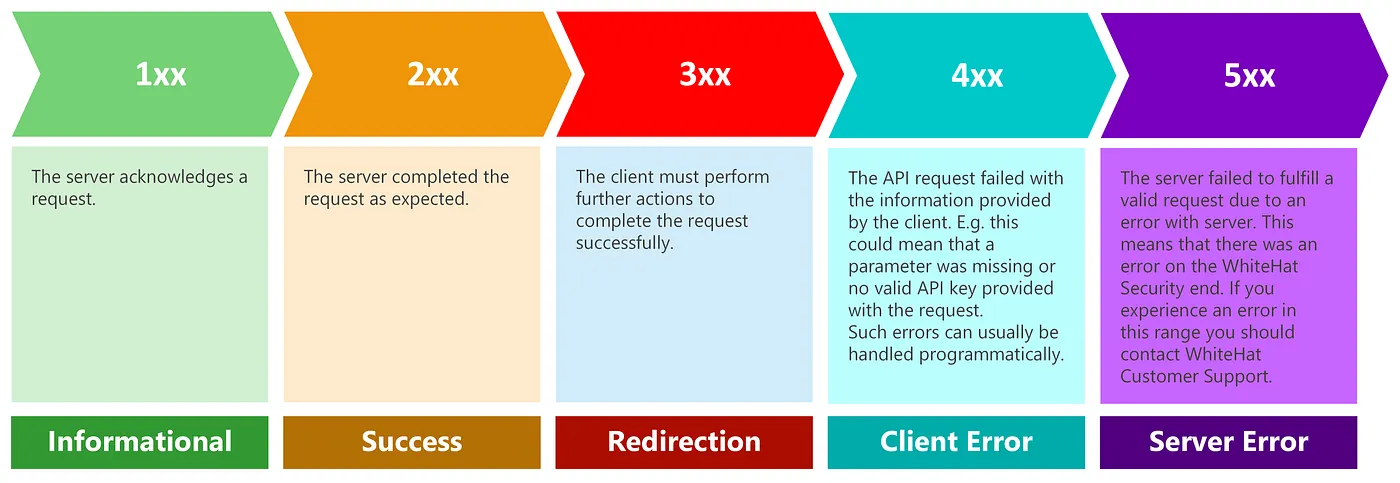 API Error Handling
1. Resource Not Found (404)
- When performing operations like GET, PUT, PATCH, DELETE on a resource identified by an ID, if the resource does not exist, the API must return 404 Not Found.
- Returning 200 OK with a message like “resource not found” is incorrect, because clients rely on the HTTP status code to handle errors programmatically.
Example:
GET /api/v1/namespaces/default/pods/nonexistent
Response: 404 Not Found
2. Validation Errors (400, 422)
If the client sends invalid input, such as:
- Missing required fields
- Incorrect data types
- Malformed JSON
the API should return 400 Bad Request or 422 Unprocessable Entity.
Frameworks like FastAPI + Pydantic or Spring Boot with validation annotations make it easy to automatically validate input and return the appropriate status code.
3. Authentication and Authorization Errors (401, 403)
- 401 Unauthorized: The client’s identity could not be verified (e.g., missing or invalid token).
- 403 Forbidden: The client is authenticated but does not have permission to perform the requested operation.
These errors were covered in the Authentication and Authorization section, but they are a crucial part of robust error handling.
4. Method Not Allowed (405)
405 Method Not Allowed is returned when the client attempts to use an HTTP method that is not supported for a given resource.
Example:
POST /api/v1/customers/{id}
Response: 405 Method Not Allowed
This error is typically implemented automatically by the framework (e.g., FastAPI or Spring Boot), based on how routes and HTTP methods are defined. The application logic should not manually handle this case.
5. Rate Limiting (429)
429 Too Many Requests indicates that the client has exceeded the allowed request rate.
This error is:
- Typically enforced at the API gateway or infrastructure level
- Not implemented inside the application code
Common use cases include:
- Abuse prevention
- Traffic control
- Fair usage policies
The response often includes headers such as Retry-After to indicate when the client can retry.
6. Server Errors (500, 503)
- 500 Internal Server Error: Indicates unexpected failures, such as programming errors or unhandled exceptions.
- 503 Service Unavailable: Indicates that a dependency is temporarily unavailable, for example when the API cannot reach the database or an external service is down.
These codes allow clients to distinguish between a system failure and a temporary unavailability.
API Documentation
APIs should be self-describing, meaning that each endpoint should be clear and understandable without requiring external documentation. However, tools like Swagger have greatly simplified the publication and management of API documentation. Frameworks such as FastAPI allow you to automatically generate Swagger documentation for every API, making it interactive and easily accessible.
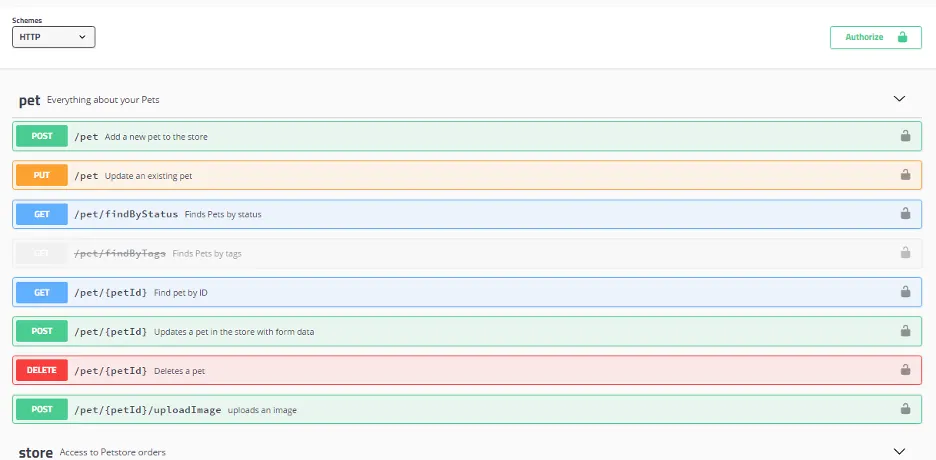 API Documentation with Swagger
When using Swagger, it’s a best practice to group APIs by the entities they belong to. In FastAPI, this can be achieved using tags. For example, all APIs related to a specific entity, such as Customer, can be grouped under the Customer tag. This approach helps to keep the documentation clear and well-structured, with each group of APIs representing the “rules” for that particular entity.
For every API, it’s essential to properly document the following details in the code:
- Summary: A brief description of what the API does, allowing users to quickly understand its purpose.
- Description: A more detailed explanation of the API, providing additional context on its behavior.
- Parameters: A list of all the parameters the API accepts, along with information about their type and whether they are required.
- Error Codes: A list of possible error codes the API may return, along with brief explanations of what each code means.
These details will automatically be included in the Swagger documentation, making it comprehensive and easy to navigate.
Moreover, Swagger also acts as a client, allowing developers to directly test the APIs from the documentation interface, which simplifies testing and debugging during development.
Conclusion
In this article we covered:
- Entity modeling from requirements: How Clean Architecture principles and user stories identify domain entities and their boundaries prior to writing any API code.
- Resource mappings and relationships: Structuring RESTful endpoints with plural naming conventions and shallow nesting hierarchies (maximum 2 entities).
- HTTP semantics and operations: Mapping CRUD and action-based workflows to standard HTTP methods (
GET,POST,PUT,PATCH,DELETE) with predictable status codes. - Authentication, authorization, and context: Enforcing access controls via roles, scopes, and execution contexts, using Kubernetes RBAC (
Role,ClusterRole,RoleBinding) as an architectural blueprint. - Standardized error handling and Swagger documentation: Returning machine-readable status codes and using tags and OpenAPI metadata to generate self-documenting APIs.
The next article will put these architectural principles into practice: building a production-ready asynchronous REST API using FastAPI, with thread pools for blocking operations and dependency injection patterns.
If you enjoyed this article, don’t forget to give it a clap 👏, share it with your friends 🔗, and follow me for more tips and tutorials on software development 📘. Your support helps me create more content like this — thank you! 🙌