Containers vs Virtual Machines
Posted on 26 Jul 2026
Introduction
This is the second article of the Getting Started with Docker series. In the previous article we introduced Docker and ran our first container. Before going further, it is worth spending time on a fundamental question: what is the real difference between a container and a virtual machine?
When I started working with Docker this was not easy to grasp. The two technologies look similar from the outside — both give you an isolated environment to run software — but they work in completely different ways under the hood.
Virtualization can be achieved in two ways:
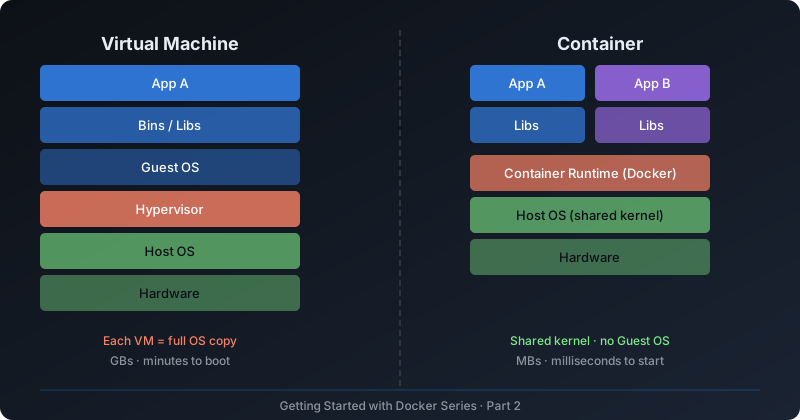
- Full virtualization — a hypervisor simulates enough hardware to run a complete guest operating system. This is the Virtual Machine approach.
- Operating system-level virtualization — the OS kernel itself is used to create isolated environments that share the same kernel. This is the Container approach.
Virtual Machines
Historically, as server processing power grew, applications running on bare metal couldn’t exploit the abundance of available resources. Virtual Machines were born to solve this: by running a hypervisor on top of physical hardware, you could carve up one server into many independent guest systems.
A hypervisor (also called Virtual Machine Monitor) is the software layer that sits between the hardware and the virtual machines. It can be type 1 (bare metal, like VMware ESXi or KVM) or type 2 (hosted, like VirtualBox or Parallels).
Each VM includes:
- A full copy of a guest operating system
- Virtual hardware (CPU, RAM, disk, network)
- All the application dependencies
The system running the VMs is called the host, the systems running inside are called guests.
Pros and cons of VMs

Pros
- Strong isolation — each VM has its own kernel.
- Run different operating systems on the same host (Windows on Linux, etc.).
- Create and destroy on demand in minutes.
- Snapshot a VM at any point in time.
- Foundation of the IaaS cloud model (AWS EC2, Azure VMs, etc.).

Cons
- Heavy — each VM carries a full OS (GBs of disk, hundreds of MB of RAM).
- Slow to boot — minutes, not seconds.
- Hypervisor adds overhead to application execution.
- Managing a large fleet of VMs is operationally expensive.
The rise of VMs gave birth to the Infrastructure as a Service (IaaS) market. Companies like Amazon, Microsoft, and IBM allow you to rent virtual machines on demand. A startup today does not need to buy physical hardware — it registers an account with a cloud provider, orders a VM with the required specs, and is ready in minutes.
Containers
A container is an isolated environment created using features of the Linux kernel itself — not a separate hypervisor. Multiple containers run on the same host, all sharing the same OS kernel, but each seeing its own isolated filesystem, processes, network, and users.
The two kernel mechanisms that make this possible are:
- Namespaces — give each container an isolated view of the system: its own process tree (PID namespace), network interfaces (net namespace), filesystem (mount namespace), users (user namespace), and more.
- cgroups (control groups) — limit and account for resource usage (CPU, memory, disk I/O) per container.
Together, namespaces and cgroups create the illusion of a separate machine without the overhead of emulating hardware or running a second kernel.
Important note for Mac and Windows users: because containers rely on Linux kernel features, Docker and Podman on macOS and Windows run a lightweight Linux VM behind the scenes (using Apple’s Virtualization Framework on Mac, and WSL2 on Windows). Your containers still run in that Linux environment — you just don’t see it.
Pros and cons of containers
Pros
- Lightweight — a container image is tens or hundreds of MB, not GBs.
- Fast — containers start in milliseconds to seconds.
- No overhead from emulating hardware.
- Portable — same image runs on your laptop, CI server, and production.
- Solves the "it works on my machine" problem.
- Natural fit for microservices architecture.
Cons
- Weaker isolation than VMs — all containers share the host kernel.
- Cannot run a different OS kernel (e.g., no Windows containers on Linux).
- Managing many containers requires an orchestrator (Kubernetes, Swarm).
- Security requires care — a misconfigured container can affect the host.
The Analogy
Mike Coleman on the Docker official blog provides a memorable analogy:
Houses (VMs) are fully self-contained and offer protection from unwanted guests. They each possess their own infrastructure — plumbing, heating, electrical. Apartments (containers) also offer protection from unwanted guests, but they are built around shared infrastructure. The apartment building (Docker Host) shares plumbing, heating, electrical. Apartments are offered in all kinds of sizes — from studio to penthouse. You only rent exactly what you need.
Containers and VMs: not enemies, complementaries
In practice, containers and VMs are often used together, not in opposition. The most common production setup is:
- A cloud provider gives you a VM (an EC2 instance, an Azure VM, etc.)
- Docker or a container runtime runs inside that VM
- Your application runs as containers inside Docker
VMs provide the strong isolation boundary at the infrastructure level. Containers provide the lightweight, fast, portable packaging for applications within that boundary.
Conclusion
In this article we covered:
- The difference between full virtualization (VMs) and OS-level virtualization (containers)
- How namespaces and cgroups implement container isolation
- Pros and cons of each technology
- Why containers and VMs are complementary, not competing
The next article focuses on Dockerfiles: how to write your own image definition and build a custom container image from scratch.
If you enjoyed this article, don’t forget to give it a clap 👏, share it with your friends 🔗, and follow me for more tips and tutorials on software development 📘. Your support helps me create more content like this — thank you! 🙌